An AI SEO agent that ships fixes to WordPress.
You approve every change.
Most tools called "AI SEO agents" only write blog posts. RankHive reads your Search Console data every week, drafts specific fixes for the pages you already have — titles, descriptions, internal links, page sections — and writes the ones you approve to WordPress, with the evidence attached to each one.
The gap between "AI SEO" and SEO that actually moves
The market flooded with AI SEO tools in 2024 and 2025. Most of them do one thing: generate content. They take a keyword, produce a draft article, and offer to publish it. That is useful, and RankHive writes articles too. But new posts do nothing for the pages you already have that sit on page two.
What most WordPress sites need is someone — or something — to look at Search Console every week, find the pages that are close to ranking, draft the specific title or meta or content fix, and get it live. Without a spreadsheet. Without blind auto-publishing.
That is what an AI SEO agent should mean for WordPress: discovery from real data, drafting real artifacts, human approval, shipping through your CMS. RankHive is built around that loop.
The confusion is vocabulary. Vendors call everything an "agent" now — chatbots, writers, reporting dashboards. We use the word narrowly: software that produces finished SEO artifacts and writes them to your CMS after you approve. If it does not ship, it is not an agent. It is a suggestion engine.
How it works
Connect Search Console + WordPress
Sign in with Google for read-only Search Console access. Install the RankHive plugin on WordPress. The first audit starts when you subscribe.
Agent finds opportunities
Striking-distance keywords, missing metas, thin sections, schema gaps, internal link holes — ranked by impact from your actual impressions.
Agent drafts the fix
Not "improve SEO on this page." A specific new title tag. A meta description. An internal link with its anchor text. A rewritten section. Ready to review.
You approve or reject
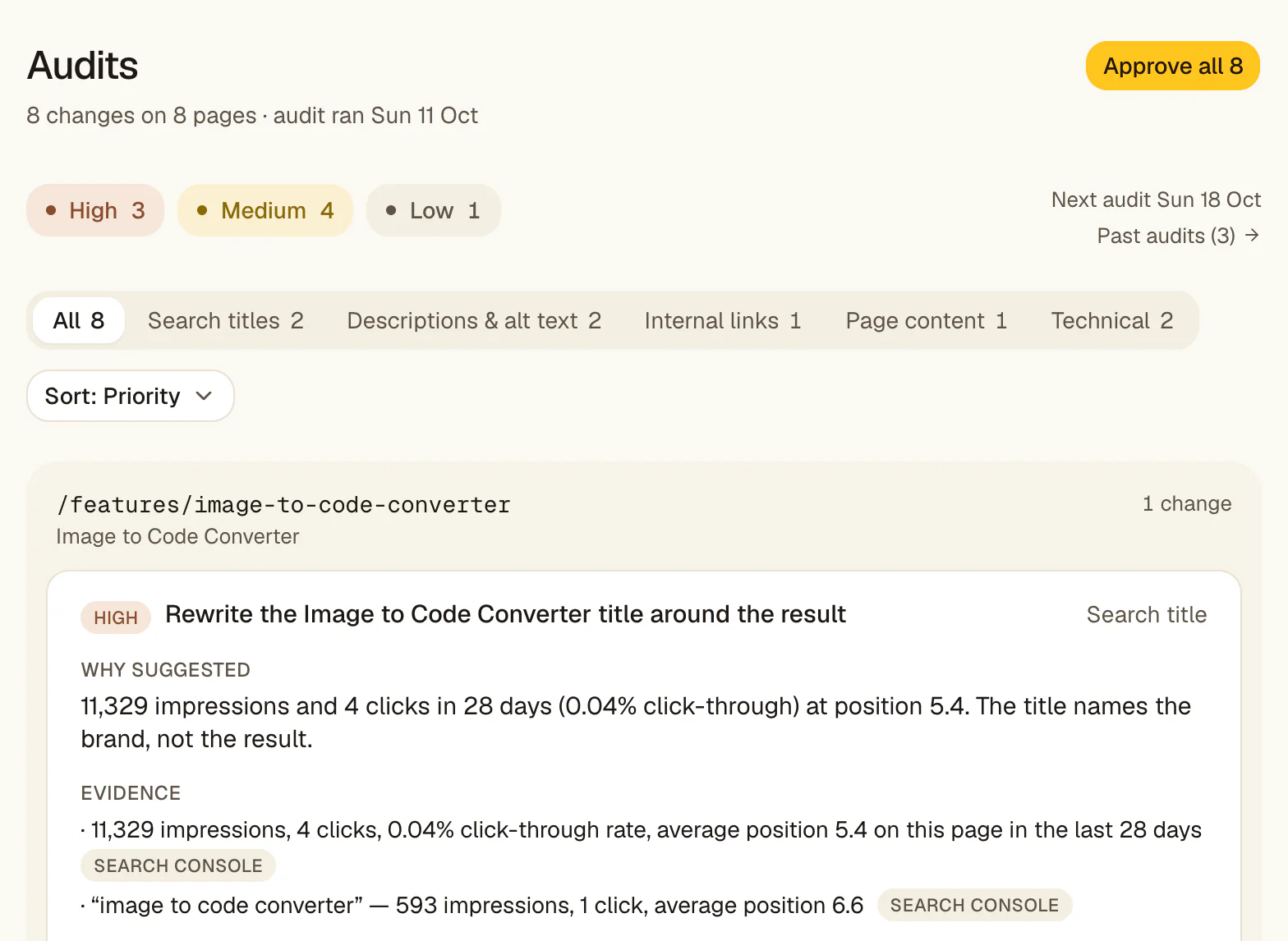
Every draft sits in a queue with the GSC query, position, and impressions that triggered it.
Approved fixes ship to WordPress
Written to your live site through the RankHive plugin. Logged with the before and after, so you can revert it from the Change Log.
Agent vs chatbot vs plugin
A chatbot answers questions. You still do the work. A WordPress SEO plugin scores your content and flags issues. You still do the work. An agent — in the sense RankHive uses the word — produces finished artifacts and ships them after approval.
RankHive does not replace Rank Math or Yoast. Those plugins handle the technical layer: sitemaps, canonicals, base schema. RankHive sits on top: it decides what to change based on Search Console performance and drafts the change for you.
RankHive includes 16 article generations per month, with up to 4 starts each week and review built into the workflow. It also runs the weekly optimization loop on your existing pages.
What the agent automates on WordPress
Title rewrites for striking-distance queries. Meta descriptions for pages with impressions but weak CTR. New or rewritten sections for thin pages ranking on page two or three. JSON-LD schema for high-impression pages that lack it. Internal links with drafted anchor text. Image alt text. Canonical and noindex mistakes found through Search Console.
Each output is scoped to one URL and one change type. You are not approving a black box. You are approving a diff.
The agent does not "optimize your site" in the abstract. It optimizes specific URLs for specific queries where your data already shows traction. That constraint is what makes each one quick to review: one page, one change, the evidence next to it.
Why Search Console is the agent's brain
Most AI SEO tools start with a keyword list you type in. That is backwards for an established WordPress site. You already have hundreds of pages earning impressions. Search Console tells you which queries those pages almost rank for, which titles get clicks, and where CTR lags behind position.
RankHive's agent reads that signal every week. It does not guess what your site should rank for — it reads what Google is already testing you for and asks: what small on-page change would move this URL from position 9 to position 4? That is a fundamentally different optimization problem than generating net-new content.
When impressions are attached to every proposal, approval becomes fast. You are not debating whether "best CRM software" is the right target. You are looking at a page that already gets 2,400 impressions/month for that query at position 11 and deciding whether the drafted title rewrite is better than what is live.
The weekly loop most site owners never finish
The manual SEO loop looks simple on paper: open Search Console, export queries, sort by opportunity, open WordPress, edit titles and metas, add internal links, update schema, save, repeat. In practice it eats an afternoon and gets deprioritized the moment anything else is urgent.
An AI SEO agent should collapse that loop, not add another dashboard to check. RankHive runs the scan, ranks opportunities by impact, drafts the artifact, and queues it. Your job shrinks to judgment: approve, edit, or discard.
Consistency matters more than intensity in SEO. A site that ships five evidence-backed fixes every week for a year compounds. A site that does a heroic quarterly audit and then forgets for three months does not. The agent exists to make the weekly version the default.
What "agentic" means without the hype
Agentic SEO became a buzzword in 2025. Vendors slapped it on chatbots, content spinners, and reporting tools. We use it narrowly: software that takes actions in your CMS on your behalf, within guardrails you control.
RankHive's agent has a bounded job description. It reads performance data, drafts on-page changes for existing URLs, drafts up to 16 articles a month for keywords you pick, and writes approved changes to WordPress. It does not buy links, rewrite your brand voice without review, or publish 50 posts while you sleep.
The test for any tool calling itself an agent: does it produce a finished artifact you can approve, or does it produce a suggestion you still have to implement? If you are copying from a chat window into WordPress, you have a chatbot. If you are clicking Approve on a diff with GSC evidence attached, you have an agent.
Built for WordPress, not generic CMS theater
WordPress is not just another CMS in our product design. It is the environment. The RankHive plugin handles signed (HMAC) server-to-server calls, writes only what you approved, and suppresses its own change notifications so agent edits do not echo back as duplicate work.
That means approved changes land where your team already looks — titles and descriptions in your SEO plugin's own fields, page edits in the post body, schema as JSON-LD in the page head. No proprietary overlay. No duplicate SEO layer fighting your stack.
Tools that treat WordPress as an afterthought often end at a CSV export or a Zapier hook. RankHive writes to WordPress itself, because that is where the change has to land.
Week one: what to expect after you connect
Setup: sign in with Google for read-only Search Console access, check the site summary RankHive writes about you, install the RankHive plugin and approve the connection, then choose a plan. Before you pay, onboarding shows the first places RankHive found to look in your data.
The first audit starts when your subscription is confirmed and usually finishes within minutes. It reads the last 28 days of Search Console data for your posts and pages, plus about 90 days for pages that are losing clicks. After that, a new audit runs every week, and fixes you have not reviewed are replaced by the new ones.
Week one discipline: read every proposal, approve only what you understand, discard anything that feels off-brand. You are calibrating trust, not clearing a backlog.
If the first audit finds little, check that you picked the right Search Console property and that your pages have impressions. Brand-new sites need content and crawl first; automation amplifies traction you already have.
Long-term, the agent works like any weekly habit: small approved changes on high-impression URLs add up. Approve the drafts you understand, discard the rest, and judge the results in your own Search Console.
Use cases
You run a content site with 120 posts. Search Console shows 40 pages getting impressions but stuck on page two. You know the fixes — better titles, FAQ blocks, internal links — but you publish new content instead because optimization never feels urgent.
RankHive queues each week's proposals ranked by impression volume. You approve the ones worth shipping, without hiring an SEO contractor to find and draft them.
You know you should publish more, but every keyword tool shows you terms you cannot win, and writing takes a day per post.
The Keywords page shows search volume and difficulty for ideas based on your site, and warns you when one of your pages already ranks. Pick one, review the outline, and RankHive drafts the article. Up to 16 a month, each waiting for your approval.
You manage twelve WordPress client sites. Each needs a weekly optimization pass but account managers cannot bill hours of title-tag editing. Reports are easy; shipping fixes is where retainers get thin.
Each client site gets its own subscription, weekly audit, approval queue and change log. Strategists review proposals; approved changes ship without opening twelve wp-admin tabs.
Integrations that close the loop
Google Search Console connects via OAuth. RankHive reads queries, pages, impressions, clicks, and positions — read-only. No Google password stored. The agent's opportunity ranking runs on your real performance data, refreshed on a weekly cadence.
The RankHive WordPress plugin pairs your site through a handshake you approve: a one-time claim token, then signed (HMAC) requests. Approved changes are written to posts, pages and their SEO fields. Page edits target the exact passage they were drafted for, so they stop rather than guess if the text has changed.
Yoast, Rank Math or SEOPress stay in place for sitemaps, breadcrumbs, and schema templates. RankHive writes titles, descriptions and canonicals into their fields, so you need one of them installed for those changes to show on the page. You keep the stack you already configured.
Security and control by design
Every production write requires explicit approval. There is no auto-publish mode. You can approve a whole audit at once with Approve all, but that is still your click.
The Change Log stores the before and after of every shipped edit. Revert restores the previous title, description, page content, schema, redirect or robots.txt.
WordPress access uses HMAC-SHA256 signed requests with timestamp and nonce replay protection. Credentials are scoped to the RankHive plugin namespace. We do not store your WordPress admin password. Disconnect revokes API access immediately.
Who this agent is not for
RankHive is not a content farm. It drafts up to 16 articles a month, and each one waits for your review. If your strategy is publishing thirty AI posts a month with no editorial review, use a different tool.
It is not for site owners who want zero involvement. Approval is the product. If you will never open the queue, nothing ships and you will not get value.
It is not for non-WordPress sites. The agent ships through WordPress REST API and the RankHive plugin. Shopify, Webflow, and headless stacks are out of scope today.
It is not a link-building or PR tool. The agent works on on-page and technical fixes on URLs you control. Off-page SEO is a different job with different risk.
Common objections
I already have ChatGPT — why do I need this?
ChatGPT does not read your Search Console data, cannot prioritize by your actual impressions, and cannot write to WordPress. RankHive closes the loop from signal to shipped fix. ChatGPT is a drafting assistant; RankHive is an agent with your site's data and CMS access — bounded by approval.
Won't AI-generated title changes hurt my rankings?
Blind bulk changes can hurt. That is why nothing ships without your review. Every proposal shows the current title, the drafted title, and the GSC query driving the change. You discard bad drafts. If a live change underperforms, revert it from the Change Log.
My SEO plugin already has an AI feature.
Plugin AI features typically score content inside the editor or suggest keywords while you write. They do not run a weekly Search Console scan across your whole site, rank opportunities site-wide, and ship approved fixes via API. RankHive complements your plugin — it does not replace the technical foundation.
I don't trust software making changes to my live site.
Neither do we — without you in the middle. Approval is not a setting you can switch off. Every write is logged with its before and after. Requests to your site are signed, so the plugin only accepts writes from RankHive. You are not handing over your admin password; you are reviewing a queue.
Capabilities
No blind publishing
The agent drafts. You decide. There is no setting that lets it publish on its own.
Plugin-compatible stack
Keep Yoast, Rank Math or SEOPress for the technical layer. RankHive handles the weekly optimization loop.
Runs every week
Not a one-time audit. A recurring agent pass on your Search Console data.
Frequently asked questions
Is RankHive an AI SEO agent or a content writer?
Both, with you approving each piece. Every week it drafts fixes for pages you already have: titles, descriptions, internal links and page sections. It also drafts up to 16 new articles a month for keywords you pick. Nothing is published until you approve it.
Does it replace Yoast or Rank Math?
No. Keep your SEO plugin for sitemaps, canonicals, and base configuration. RankHive adds the agent layer that drafts and ships performance-driven changes.
How is this different from ChatGPT for SEO?
ChatGPT does not read your Search Console data, prioritize by impressions, or write to WordPress. RankHive connects all three.
Can the agent publish without my approval?
No. Every change waits for you to click Approve, either one at a time or with Approve all. There is no auto-publish setting.
What WordPress sites does it work with?
Any WordPress site on WordPress 6.5+ and PHP 8.1+ where you can install a plugin: blogs, local business sites, content sites. RankHive works on posts and pages. WooCommerce product pages are not supported yet.
How soon do I see proposals after setup?
Your first audit starts the moment you subscribe and usually finishes within minutes.
What types of changes can the agent draft?
Search titles, meta descriptions, canonical tags, internal links with anchor text, rewritten page sections, JSON-LD schema, image alt text, and redirects. Each proposal is one page and one change, with the current text next to the proposed text.
Does the agent work on WooCommerce product pages?
Not yet. RankHive connects to a WooCommerce store like any WordPress site, but it only audits and edits posts and pages. Product and category pages are not included.
What happens if I reject a proposal?
It never touches WordPress. A later audit may suggest a fix for the same page again, with fresh evidence, if the data still points at it.
Can I roll back a change after approval?
Yes, for titles, descriptions, page content, schema, image alt text, canonicals, redirects and robots.txt: click Revert in the Change Log, then confirm. New articles are not reverted there.
Connect WordPress → see your first SEO fixes
Setup takes under ten minutes. Your first audit starts the moment you subscribe.