Automatic SEO for WordPress.
SEO autopilot that waits for your yes.
Automatic SEO means software does the recurring SEO work — reading your search data, finding what to fix and drafting the change — instead of you or an agency. RankHive does that for WordPress every week, then waits for your approval before it changes anything on your site.
SEO is not a one-time project. It is a weekly job. Most WordPress site owners do not have time for it.
The data is in Search Console. The opportunities are in the data. The problem: pulling the data, deciding what to fix, writing the changes and getting them into WordPress is a job you have to redo every week.
So it slips. You publish new posts and hope. Auto SEO done properly runs that job for you every week and hands you only the part that needs a human: a yes or no on each drafted change.
Four ways to get SEO done automatically, compared
“Automatic” can mean an agency doing it for you, a tool publishing without you, or software that does the legwork and asks first. The difference is who decides what goes live.
| Option | Who finds the work | Who makes the change | Who approves it | Cost model | Undo |
|---|---|---|---|---|---|
| Do it yourself with an SEO plugin | You, in Search Console | You, in wp-admin | You | Free plugin plus your time | By hand, if you kept the old value |
| Done-for-you SEO agency or freelancer | The agency | The agency, usually with wp-admin access | Often the agency; you see a monthly report | Monthly retainer | Depends on their process |
| Auto-publishing AI tool | The tool | The tool | Nobody, before it is live | Subscription | Often none |
| RankHive (SEO autopilot) | RankHive, from your Search Console data every week | RankHive drafts it; its plugin writes it | You, every change | $49.99 a month for one WordPress site | Revert from the Change Log |
Revert in RankHive covers titles, descriptions, page content, schema, image alt text, post status, canonicals, redirects and robots.txt. New articles are not reverted from the Change Log.
How SEO autopilot works
Five steps. Runs every week. You are only needed for step four.
Connect your data
Link Google Search Console and your WordPress site in under 10 minutes. RankHive starts reading your search performance data straight away.
It finds the opportunities
Every week it analyzes your Search Console data: striking-distance keywords, titles nobody clicks, thin content, technical issues and internal link gaps, ranked by impact.
It drafts the changes
For each opportunity it produces a specific draft: a new title tag, a meta description, a rewritten section, an internal link or schema markup — not a vague suggestion.
You review and approve
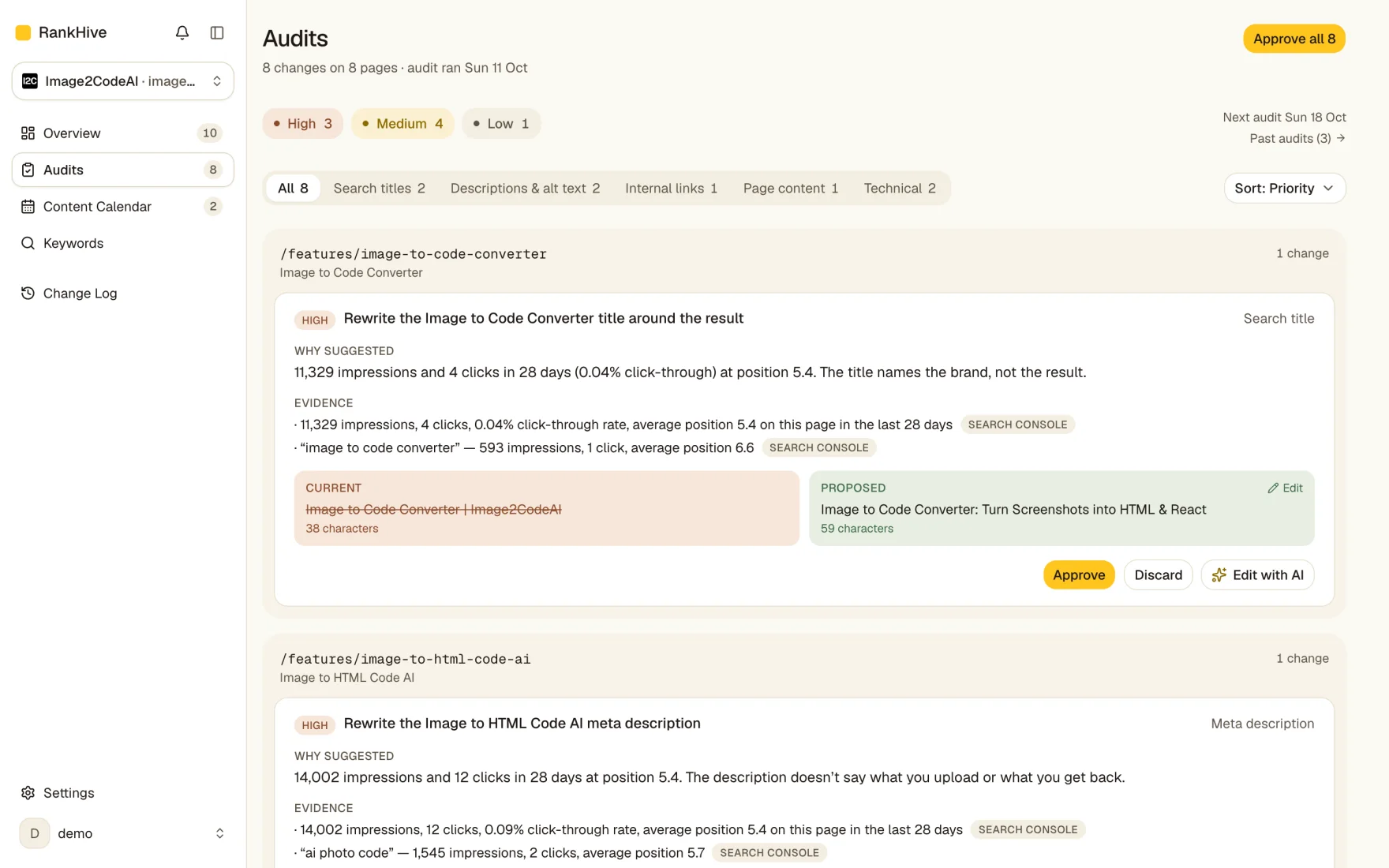
Each draft appears in your approval queue next to the evidence behind it. Approve the good ones, edit the close ones, discard the rest.
Changes ship to WordPress
Approved changes go to WordPress through the RankHive plugin. No copy-paste, no wp-admin. Every change is logged with its before and after, and most can be reverted.
RankHive does the legwork. You make the calls.
The SEO work still happens. RankHive does the parts that follow rules. You keep the parts that need judgment.
- Reads your Search Console data every week
- Finds pages stuck on page two, titles nobody clicks, missing internal links and technical problems
- Drafts the fix: the new title, the description, the link, the section
- Writes the changes you approve to WordPress and logs the before and after
- Approve, edit or discard each fix
- Pick the keywords you want articles for
- Revert a change from the Change Log if you change your mind
What automatic SEO covers in RankHive
Eight kinds of fix. All evidence-based. All waiting for your approval before going live.
Is autopilot SEO the same as done-for-you SEO?
Half of it. Done-for-you SEO usually means an agency or freelancer finds the work, decides what to change and makes the change, and you read a report at the end of the month. Autopilot SEO in RankHive does the first and last parts for you — finding the work in your Search Console data and writing the change to WordPress — and leaves the middle part, the decision, with you.
That split is deliberate. The decision is where brand, accuracy and context live, and it is the part software gets wrong in ways that are expensive and slow to notice. Reading a drafted change and clicking Approve takes seconds; cleaning up a wrong title on your best page takes much longer.
If you want no involvement at all, hire a done-for-you agency and read our notes on auto-publishing first. If you want the work done but the calls kept, that is what this is. Comparing tools rather than services? See SEO automation software compared.
Built with the approval gate at the center
Three principles that make RankHive safe to run on a live production site.
Nothing goes live without your approval
Every proposal sits in the approval queue until you explicitly click Approve. There is no auto-publish mode. There is no bypass.
Every proposal shows its evidence
The Search Console query, the impression count, the current position, the affected page, and the current text next to the proposed text.
Full change log with revert
Every shipped change is logged: date, page, before, after. Revert it from the Change Log if you change your mind.
Who SEO autopilot is for — and who should skip it
SEO autopilot fits WordPress site owners who already have indexed content and Search Console history. You have pages ranking positions 5–20 with impressions. You know the fixes matter. You do not have a spare afternoon every week to pull GSC exports, prioritize by hand, edit titles in WordPress, and hope you remembered every URL.
It fits a WooCommerce store's blog posts and landing pages, but not its catalogue: product and category pages are not supported yet. It can fit agencies too, with one subscription per client site: there is no multi-site plan yet.
Skip it if you want zero human review of changes — RankHive will frustrate you on purpose. Skip it if your site has five pages and no GSC data yet — publish more, get indexed, come back in three months. Skip it if you need link building, local listings or page speed work, or if your site is not on WordPress.
What connects, what ships, what stays under your control
Google Search Console connects via OAuth. RankHive reads queries, pages, impressions, clicks, and average position. Read-only on GSC — we never need write access to your Google account.
WordPress connects through the RankHive plugin and REST API. Reads post content, titles, metas, and schema. Writes only fields you approved in a specific proposal. Every write maps to a proposal ID in the change log.
Your SEO plugin — Yoast, Rank Math or SEOPress — stays in place for sitemaps and base configuration, and holds the titles and descriptions RankHive writes. All in One SEO isn't supported yet. RankHive does not replace that layer; it automates the weekly loop on top: what to change based on performance data, drafted and shipped after you say yes. Choosing a plugin first? See Rank Math vs Yoast.
ROI framing: what you are actually buying
SEO autopilot is not priced against manual SEO you were already doing. It is priced against manual SEO you were deferring. The Search Console tab that opens once a quarter. The striking-distance keywords sitting at position 9 for eighteen months. The meta descriptions that never got written.
One recovered striking-distance keyword — a page already earning impressions that moves from page two to page one — can be worth more per month than the entire subscription. The comparison is not software cost vs agency retainer. It is maintained vs neglected.
What you still do: read each drafted fix and decide. What you stop doing: exporting Search Console, sorting queries and writing titles from scratch in wp-admin. There is no free trial, but onboarding shows the first places RankHive found to look in your own data before you pay. See pricing.
Common objections
“Will Google penalize AI SEO changes?”
Google penalizes low-quality scaled publishing, not title and meta improvements you review. Approval-gated autopilot is the safe pattern — see when an SEO agent should never auto-publish.
“I already have Yoast / Rank Math.”
Keep it. Plugins score and configure. Autopilot finds what to change from Search Console and ships approved fixes. Stack, not replace.
“I tried ChatGPT for SEO and it did not move rankings.”
ChatGPT does not read your GSC data, prioritize by impressions, or write to WordPress. It drafts in a vacuum. Autopilot closes the loop from data to live change.
Frequently asked questions
What is automatic SEO?
Software doing the recurring SEO work instead of a person: reading your search data, finding pages worth fixing and drafting the change. Good automatic SEO still asks you before it changes your site. RankHive does this for WordPress every week and ships each fix only after you approve it.
Does RankHive publish changes automatically?
No. Every change requires your explicit approval before it goes live. The approval gate is a core design principle, not an optional setting. Approve all exists for an audit you have read, and it is still your click.
Is RankHive done-for-you SEO?
Partly. The finding and the drafting are done for you, and approved changes are written to WordPress for you. The decisions stay yours: nothing ships until you approve it. If you want zero involvement, a done-for-you agency is a better fit.
Is auto SEO safe?
Unreviewed auto SEO is the risky kind: a bad title or invented schema can go live on your best page. Google's spam policies target scaled, low-value content published without review, not better titles and descriptions a person checked. RankHive drafts each change and you approve it, the same as if a freelancer had sent you the edit.
How long does setup take?
Under 10 minutes. Sign in with Google for read-only Search Console access, install the RankHive WordPress plugin, and approve the connection. Before you pay, onboarding shows the first places RankHive found to look. Your first audit starts the moment you subscribe and usually finishes within minutes.
What does it cost?
$49.99 a month, or $499.99 a year, for one WordPress site. That includes the weekly audit, every drafted fix and up to 16 new articles a month. There is no free trial.
What data does RankHive access?
Search Console performance data, read-only (queries, pages, impressions, clicks, positions); keyword and search-result data from DataForSEO; Core Web Vitals from Google's public CrUX data; and your WordPress content through the RankHive plugin, which writes only the changes you approve.
Does it work for any type of WordPress site?
Any site on WordPress 6.5+ and PHP 8.1+ where you can install a plugin: blogs, content sites, local business sites. RankHive works on posts and pages; WooCommerce product pages are not supported yet. Title and description changes need Yoast, Rank Math or SEOPress installed (All in One SEO isn't supported yet).
How many proposals does RankHive generate per week?
It depends on your site. Each weekly audit drafts a fix for every opportunity it can back with evidence, sorted by priority so the highest-impact changes come first. Fixes you have not reviewed are replaced by the next audit, so the queue never piles up.
Can I roll back a change after it ships?
Yes, for titles, descriptions, page content, schema, image alt text, canonicals, redirects and robots.txt: click Revert in the Change Log, then confirm. New articles are not reverted there.
How does SEO autopilot compare to hiring an agency?
Agencies do strategy, link building and site restructures. RankHive does the recurring on-page work: titles, descriptions, schema and internal links on pages that already get impressions, plus new articles. If your agency sends a monthly report but the fixes in it never ship, RankHive is the part that ships them.
What results should I expect?
We can't promise a number, and we don't have enough customers yet to publish an honest average. The math to run on your own site: find a page on page two of Google with a few thousand impressions a month. If a better title moves it onto page one, that page alone may be worth more than the subscription. Google has to recrawl a page before a new title counts, so give each change a few weeks before you judge it.
Do I still need Yoast or Rank Math?
Yes. Your SEO plugin handles sitemaps, breadcrumbs and schema templates, and RankHive writes titles and descriptions into its fields, so you need Yoast, Rank Math or SEOPress (All in One SEO isn't supported yet). RankHive handles the weekly loop on top — what to change based on Search Console, drafted and shipped after you approve.
Learn more about automated SEO
Go deeper on how SEO autopilot works, the keywords it targets first, and the technical groundwork that makes the automation pay off.
See what RankHive would fix on your site
Connect WordPress and Search Console in under 10 minutes. Your first audit starts the moment you subscribe, and nothing changes on your site until you say yes.
Already have an account? Sign in