Every SEO change reviewed before it ships.
That is the workflow.
RankHive puts every drafted fix in a queue with the Search Console evidence that prompted it. You approve what looks right, edit what is close, and discard the rest. Nothing else goes live: machine speed for drafting, human judgment for shipping.
Why approval matters more than automation speed
The SEO tools racing to "publish 100 posts a month" are optimizing for a metric that is not rankings — they are optimizing for output. Google's spam policies explicitly target scaled, low-effort content. Auto-publishing SEO changes without review is the same risk at smaller scale.
The approval workflow is not bureaucracy. It is the difference between automation that saves time and automation that creates cleanup work. Reading a drafted change takes less time than cleaning up one nobody checked.
Your WordPress site is a revenue asset. Titles, metas, and schema on money pages are not good candidates for blind automation. The approval queue exists so you get the speed of machine-drafted artifacts without the risk of machine-only judgment.
Teams that skip approval often do not notice the damage immediately. Rankings drift, CTR softens, a client asks why a product page title sounds wrong. A revert fixes the symptom; approval prevents it.
The workflow also creates accountability. When every shipped change has a Change Log entry and the evidence behind it, SEO stops being a black box and becomes a process you can check.
If you are comparing RankHive to auto-publish tools, compare workflows — not feature lists. The approval queue is the product differentiator, and it is the reason your production site stays under your control.
How it works
Agent drafts a fix
Weekly GSC scan surfaces an opportunity. The agent produces a finished artifact — title, meta, schema, content block, or internal link — scoped to one URL with evidence attached.
Proposal enters the queue
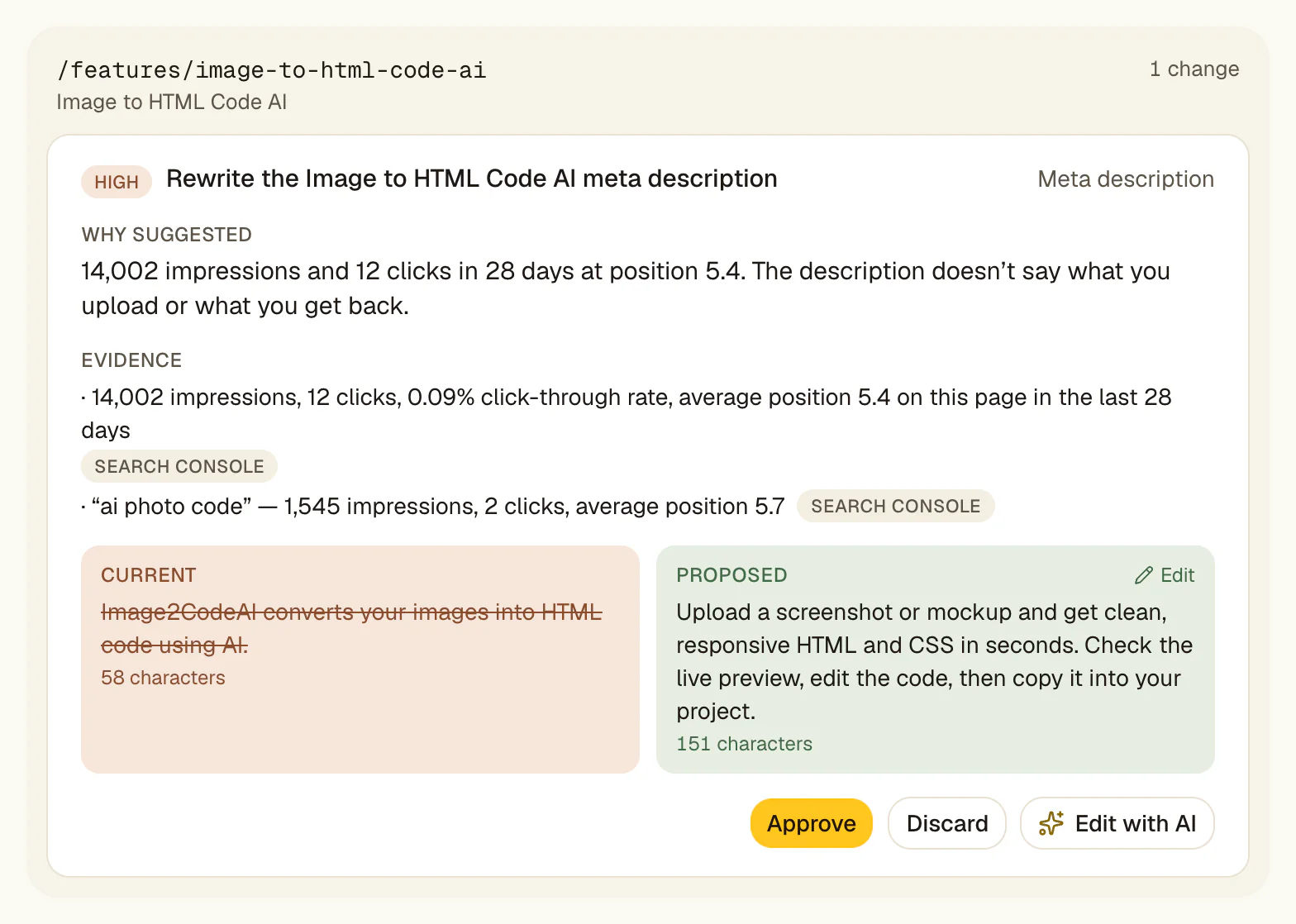
You see URL, change type, before/after preview, and the query with impressions and position. No write call is made yet.
You approve or reject
Approve sends it to WordPress. Discard drops it — your site is untouched. Leave it, and next week's audit replaces it with fresh drafts.
Approved change ships
A signed (HMAC) request updates the live field. The Change Log keeps the before state so you can revert.
Audit and iterate
Watch Search Console. Revert from the Change Log if needed. The loop repeats weekly.
How the approval queue works
Each proposal arrives with four things: the affected URL, the change type (title, meta, schema, content block, internal link), the draft content, and the Search Console evidence — query, impressions, position — that triggered it.
You click Approve, Edit or Discard. Approved items are written to WordPress. Discarded items never touch your site. For an audit you have read and trust, Approve all publishes every pending change after a confirmation. There is no setting that approves anything for you.
The queue is sorted by priority, so the changes most likely to matter come first. Anything you do not review is replaced by the next weekly audit; nothing ever expires into auto-publish.
Teams and agencies
You can invite teammates to a site's workspace, so a strategist and a client can both see the queue. There are no separate approval roles yet: anyone invited can approve.
Each client site is its own subscription with its own queue. You are not mixing client A's proposals with client B's.
If you need separate strategist and client approval steps, or read-only access for clients, RankHive does not do that yet. Tell us; it shapes what we build next.
Revert and the Change Log
Every shipped change stores its before state. If a title rewrite does not perform after 30 days, Revert in the Change Log restores the previous title. Titles, descriptions, page content, schema, image alt text, post status, canonicals, redirects and robots.txt can be reverted; new articles cannot.
Revert is not an emergency-only feature — it is a normal part of experimentation. SEO is hypothesis-driven. You try a title rewrite, measure, and revert if CTR drops. The workflow assumes iteration, not infallibility.
There is no export yet. For client reporting, the Change Log lists what changed on each day, so your clients see shipped work, not just strategy decks.
Why there is no auto-publish
Auto-publish is seductive in demos. Click connect, walk away, come back to a "optimized" site. That story sells software. It also creates cleanup work when the model drafts a title that misrepresents your product, stuffs a keyword awkwardly, or rewrites a page that was intentionally minimal.
Google's guidance on scaled, low-effort content is not ambiguous. Auto-publishing SEO edits is the same risk vector at smaller scale than auto-publishing articles. The approval workflow trades speed for control — and control is what makes automation safe on a revenue-generating site.
So RankHive has no auto-approval setting. The fastest path is Approve all on an audit you have read, and that is still your click.
What good approval hygiene looks like
Set a weekly slot. Review the highest-priority proposals first. Approve changes where the draft is clearly better than live and the GSC evidence supports the target query. Reject drafts that sound generic, misstate the page, or chase irrelevant queries.
Do not hoard the queue: anything you skip is replaced by next week's audit anyway. Discarding bad drafts is as useful as approving good ones; it sharpens your sense of what the agent gets right.
Revert without stigma. A shipped title that underperforms is data, not failure. Revert it, let the next audit look again, and try something else. The workflow is built for iteration.
Approval vs "suggestions" — the difference matters
Many SEO tools call their output "recommendations." You get a list of 200 things to fix. The tool's job is done. Your job is copying each fix into WordPress — if you ever get to it.
RankHive proposals are finished drafts, not suggestions. The title is written. The description is written. The schema is written. Approval is the only step between draft and live. That is the difference between a queue and a to-do list.
If a product requires you to open ChatGPT, rewrite the suggestion, paste into wp-admin, and save — you have a suggestion workflow with extra steps. Approval workflow means the artifact is ready; you supply judgment.
Measuring workflow success
The approval workflow succeeds when review time stays flat while shipped fixes grow.
Track how often you revert, not just how often you approve. Some discards and reverts are healthy. They mean you are exercising judgment. Zero discards might mean you are not reading the queue carefully; frequent reverts might mean you need stricter approval criteria on money pages. Both signals are useful.
For agencies, walk clients through the Change Log each month. Clients who see shipped work, with the before and after, understand retainer value better than clients who only see ranking charts. They can check every change in wp-admin.
Pages you never want touched
RankHive does not have an exclusion list yet. Until it does, the guardrail is the queue itself: discard any draft for your homepage, pricing, legal or checkout pages, and nothing changes there.
Decide your rules before you connect. Week one might mean approving title and description rewrites on blog posts only, and discarding page-content edits, redirects and status changes until you trust the drafts. Rules are easier to loosen than a bad change is to recover from.
Agencies: write those rules into the SOW — which pages are human-only, which change types you approve, and how a revert is handled if a live edit underperforms. The workflow is not just software — it is a delivery process your clients can understand.
For the full risk framework — industries, change-type matrices, and YMYL guidance — read the companion guardrails essay linked from this page. The approval workflow is how safe automation runs; exclusions define where it does not run at all.
Tools that market "full autopilot" optimize for the demo. An approval workflow optimizes for sites that still rank after the first month of automation. That trade is the product philosophy.
Use cases
You want SEO help but you have been burned by plugins that changed settings without asking. You need control over every live edit.
Every change waits in the queue with a visible diff and GSC evidence. You approve five title rewrites, reject two awkward metas, and nothing else touches your site. Control without manual implementation.
A freelancer offered to "AI optimize" your site. You are not handing over wp-admin. You want to see every change before it goes live.
Each change waits in the queue with the current text, the proposed text and the evidence. You approve some, edit some, and discard the rest. If a page's clicks drop after a change, revert it from the Change Log.
Clients demand transparency on what changed in WordPress. Strategists need internal review before client-visible edits ship across fourteen sites.
A queue per client site, the evidence on every card, and a Change Log you can walk a client through on a call. Approval roles and exports are not built yet.
What feeds the approval queue
Google Search Console via OAuth supplies the evidence layer — query, impressions, position, and URL. Every approval card shows the data that triggered the proposal so reviewers do not approve blind.
WordPress via the RankHive plugin and REST API is the write target. Approved items ship through HMAC-signed requests. Rejected items never initiate a write call. The integration enforces the workflow boundary.
Yoast, Rank Math or SEOPress fields are where title and description changes land. Schema is printed by the RankHive plugin as JSON-LD. Reviewers see the current text next to the proposed text.
Invite teammates to a site's workspace so more than one person can review the queue.
Security built into the workflow
No proposal ships without an approved state transition. The write API checks proposal ID and approval status. There is no backdoor bulk publish.
The Change Log stores the before and after. Each proposal keeps the Search Console evidence it was drafted from, so you know what data informed the decision even if rankings shift later.
WordPress writes use HMAC-SHA256 signing with replay protection, and only reach the RankHive plugin. Disconnect the plugin and writes stop.
Approval workflow security is not just about hackers — it is about preventing accidental bulk changes and hard-to-undo mistakes on pages that make money.
When you do not need an approval workflow
If you want fully autonomous publishing with no human review, RankHive is the wrong product. Look elsewhere — and read Google's guidance on scaled content first.
If nobody on your team will review drafts each week, nothing will ship. The workflow requires a human in the loop by design.
If you only need a one-time audit PDF, you do not need approval infrastructure. RankHive is for recurring optimization with shipped changes.
If your site is not on WordPress, the write path does not exist. Approval workflow is built for WordPress production environments.
If you trust model judgment more than your own on money pages, you may find approval tedious. That friction is intentional — it protects URLs that pay your bills.
Common objections
Approval sounds slow. Why not auto-publish high-confidence changes?
Because "high confidence" from a model is not the same as correct for your brand, your page intent, or your risk tolerance. Approval adds a click per change, or one Approve all for an audit you have read. Auto-publish adds cleanup when the model is wrong — and on a money page, one wrong title is expensive.
My team will never keep up with the queue.
Proposals are sorted by priority, so start at the top and stop when you run out of time. Anything you do not get to is replaced by next week's audit, so the queue never piles up.
We already have a content review process in WordPress.
RankHive does not bypass your editorial workflow — it front-loads the SEO artifact so your review is approve/reject instead of write-from-scratch. Treat the approval queue as the SEO review step before changes hit production fields.
Can a rogue team member approve bad changes?
Anyone you invite to the workspace can approve, so invite carefully. Every change is logged, and you can revert most of them from the Change Log. The workflow assumes humans can err.
No bypass
Approval is architectural. Not a toggle defaults-off that marketing buried in settings. The write pipeline checks proposal approval state before any WordPress mutation.
Evidence on every card
The Search Console query, impressions, and position are right there — next to the current text and the proposed text.
Replaced weekly
Fixes you do not review are replaced by next week's audit, so the queue never turns into a backlog.
Frequently asked questions
Can RankHive publish without approval?
No. Every change waits for you to click Approve, one at a time or with Approve all after a confirmation. There is no auto-approval setting.
Who should approve changes?
Site owner, SEO lead, or agency strategist — anyone who would have edited the page manually. There are no separate approval roles yet, so only invite people you would trust to edit the site.
What if I reject a proposal?
It is discarded and never touches WordPress. RankHive does not remember discards yet, so a later audit may suggest a similar fix if the data still points at it.
Is there a change log?
Yes. The Change Log lists every change RankHive made, by day, with the before and after and a Revert button for most change types. There is no export yet.
How does this compare to auto-publishing SEO bots?
Auto-publish bots optimize for volume — more changes, more content, less human involvement. RankHive optimizes for controlled, evidence-backed changes on your existing pages. The approval workflow is slower per change and safer per site.
Can clients approve their own changes?
Not as a separate role. You can invite a client to their site's workspace, but there are no approval roles yet, so anyone invited can approve.
How long does approval take each week?
It depends on how many fixes your audit finds and how carefully you read them. We do not have enough customers yet to publish an honest average. Proposals are sorted by priority, so you can stop once the important ones are done.
Can I approve changes in bulk?
Yes. Approve all publishes every pending change from the latest audit, after a confirmation that lists what will change. You can revert most of them from the Change Log afterwards.
What evidence is shown on each approval card?
URL, change type, before and after content, and the Search Console query with impressions and position that triggered the proposal. Enough context to decide without opening wp-admin.
Does reverting affect SEO plugins or other metadata?
Revert restores only the field that changed — the title, description, page content or schema — to its before state. It does not reset other plugin settings. If you edited the same field after RankHive did, reverting replaces your edit too, so check first.
Connect WordPress → see your first SEO fixes
Setup takes under ten minutes. Your first audit starts the moment you subscribe.