WordPress SEO automation that ships fixes.
Not just scores them.
Plugins score your pages. Agencies send reports. RankHive runs the loop: pull Search Console data, find what to fix, draft the change, wait for your approval, write it to WordPress.
WordPress SEO automation is not what most vendors sell
Search "WordPress SEO automation" and you will find plugins that email you a weekly report, tools that schedule social posts, and AI writers that publish blog drafts. Those are automation of information or content production. They are not automation of SEO work on your existing pages.
Real WordPress SEO automation requires three things most tools skip: reading live performance data, drafting a specific fix (not a suggestion), and shipping it through WordPress after a human says yes.
RankHive is built for that definition. Connect once. Run weekly. Approve what looks right. Everything else stays in the queue.
The industry conflates automation with notification. Getting an email that your meta descriptions are missing is not automation — it is a reminder of work you still have to do. Automation means the draft exists and the write path is ready. Your only job is judgment.
WordPress site owners do not fail at SEO because they lack information. Search Console is free. SEO plugins are cheap. The failure mode is execution: the gap between seeing a striking-distance query and actually editing the title in wp-admin. RankHive automates execution, not awareness.
If you have a Search Console tab full of page-two rankings and no time to act on them, that is the problem this solves.
How it works
Connect
Google Search Console via read-only Google sign-in, plus the RankHive WordPress plugin. Under ten minutes. No WordPress admin password shared: the plugin issues its own keys when you approve the connection.
Discover
Weekly scan for striking-distance keywords, CTR gaps, schema holes, and link opportunities — ranked by impressions from your real GSC data, not a generic keyword list.
Draft
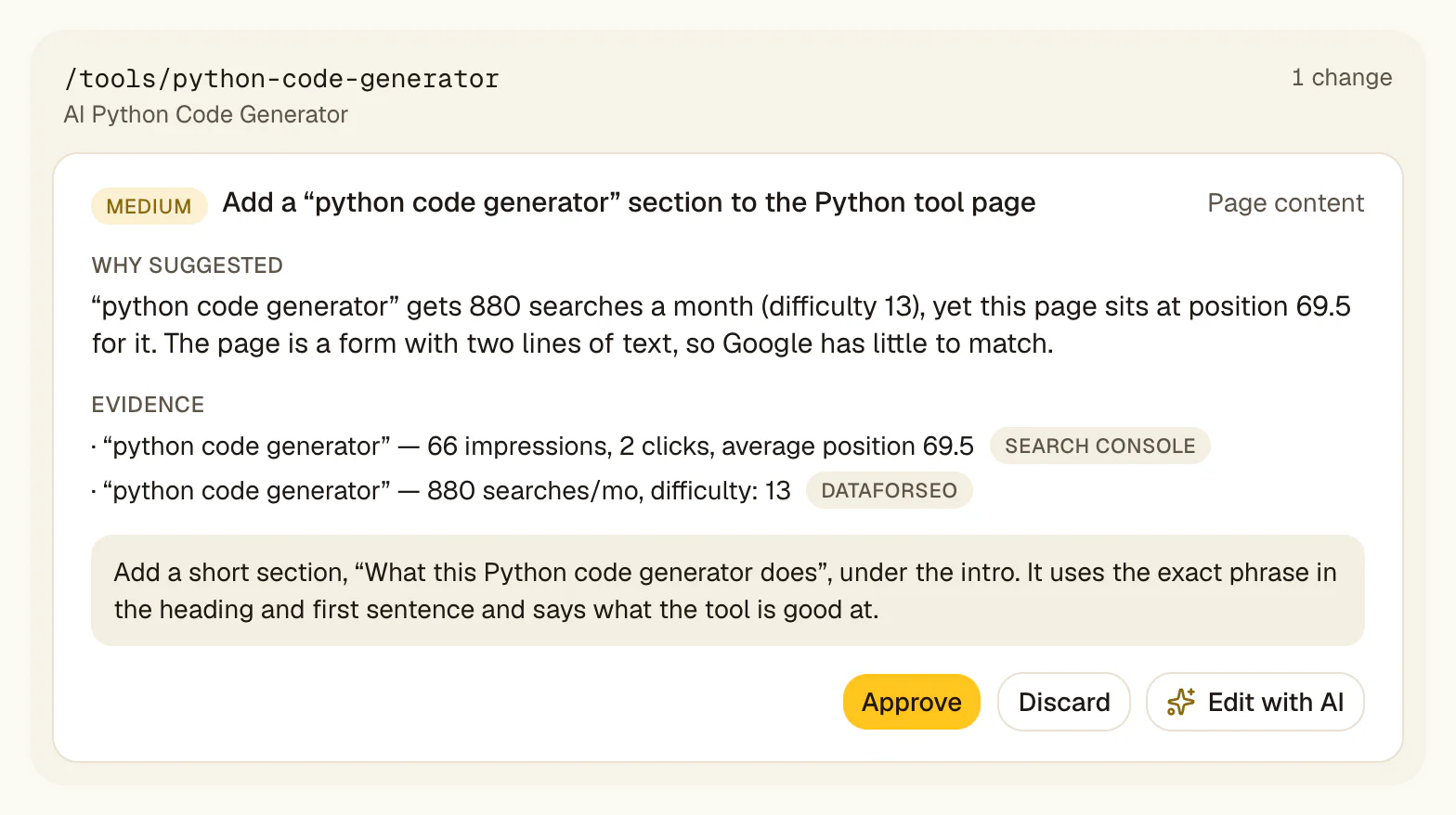
Specific changes per URL: a finished title rewrite, a meta description, an internal link, a rewritten section. Not "improve on-page SEO." The current text next to the proposed text.
Approve
Human review on every change. GSC query, position, and impressions attached to each proposal. Approve, edit, or discard. Nothing ships on its own.
Ship
Approved fixes go live through the RankHive plugin with signed requests. The Change Log keeps the before and after, so you can revert a change that underperforms.
The stack: plugin + agent
WordPress SEO automation in practice is a two-layer stack. Layer one: an SEO plugin (Yoast, Rank Math or SEOPress) for sitemaps, canonicals, breadcrumbs, and base schema. Layer two: RankHive for the weekly performance loop — what to change based on Search Console, drafted and shipped after approval.
Trying to make one plugin do both usually means a bloated admin panel and features you never use. Splitting the job matches how the work actually breaks down.
Your SEO plugin answers "is this page technically sound?" RankHive answers "given what Google is already showing this page for, what should we change this week?" Different questions, different tools, one WordPress site.
Who WordPress SEO automation is for
Solo publishers with a few hundred WordPress pages who know SEO matters but cannot spend an afternoon a week on it. Small agencies who need a repeatable optimization cadence on client sites, one subscription per site. Content-heavy sites with more pages than anyone can edit by hand.
It is not for sites that want zero human involvement in publishing. Approval is the design, not an optional safety rail.
The common thread: you already have content live and earning some search visibility. Automation should improve what exists, not flood the index with new pages nobody will approve.
Automation vs reporting — know the difference
Most products sold as "SEO automation" automate the report. They email you a PDF of issues, export a spreadsheet of keywords, or show a red/yellow/green dashboard. You still open WordPress. You still edit. You still save. The automation stopped one step before the work.
WordPress SEO automation has to include the write path. Discovery without shipping is a notification system. RankHive automates discovery, drafting, and shipping — with approval as the only manual step.
When evaluating vendors, ask one question: after your weekly scan, does the tool change anything on your site, or does it tell you to? If the answer is tell, you are buying reporting with automation branding.
The economics of weekly optimization
SEO labor does not scale linearly. A site with 200 pages does not need 4× the effort of a site with 50 — if you prioritize by impressions. Search Console makes that prioritization obvious: a small set of pages usually holds most of the opportunity.
Manual optimization fails on economics. Every week someone has to pull the data, decide and edit, and that time competes with content, ads and everything else. So SEO becomes a quarterly guilt task.
Automation reframes the math. The machine runs the scan and drafts the changes. You supply the judgment: a yes or no on each one. That makes a weekly cadence realistic, and weekly consistency beats quarterly heroics.
What gets automated in the RankHive loop
Weekly Search Console analysis and opportunity ranking. Striking-distance keyword detection across your pages. Click-through gaps on pages with impressions but few clicks. Pages losing clicks over the last 90 days. Internal link gaps with drafted anchor text. Meta description drafts for high-impression pages with empty or weak descriptions. Schema for high-impression pages that lack it.
Each output is a discrete proposal — not a site-wide "SEO score" that moved from 72 to 74. You approve title rewrites, meta updates, content blocks, and link insertions one at a time with evidence attached.
The loop repeats every week. New Search Console data surfaces new opportunities, including on pages you already changed. It is a weekly habit, not a one-time audit you pay for and forget.
WordPress-native shipping matters
Automation that ends in a CSV export is not WordPress SEO automation — it is data prep for manual labor. RankHive writes through the RankHive plugin into the fields WordPress and your SEO plugin already use. Page edits target the exact sentence they were drafted for; if that sentence has changed since, the edit stops instead of guessing.
That means approved changes appear in the same fields your team and plugins already use. No duplicate SEO layer. No copy-paste from a SaaS dashboard into wp-admin. The automation completes in production, not in a task list.
The Change Log, revert, and signed writes are part of the shipping layer — not bolt-on enterprise features. If automation cannot be undone, it is not safe to automate.
Four questions to ask any SEO automation vendor
The product is concrete: an AI agent that reads Search Console, drafts fixes, and ships them after you approve.
If you are evaluating automation vendors, use this checklist: Do they read your Search Console? Do they draft finished artifacts? Do they write to WordPress? Do they require approval? Four yes answers means you are looking at real automation. Fewer means you are looking at reporting or content production with a different label.
RankHive answers yes to all four: it reads Search Console, drafts the change, writes it to WordPress, and waits for your approval first.
Reporting tools vs agentic automation: side-by-side
A rank tracker tells you position moved from 14 to 11. A crawl tool tells you forty pages have missing metas. A content optimizer scores your draft at 72/100. None of them change your live site. You still open wp-admin, find the URL, edit the field, save, and hope you remembered every page on the list.
Agentic WordPress SEO automation closes that gap. The rank tracker signal becomes a title rewrite proposal. The crawl finding becomes a drafted meta. The content score gap becomes a specific section addition — queued with the URL, the evidence, and the before/after diff. Your job is approval, not implementation.
Teams often already pay for reporting and crawl tools. That is fine — keep them for visibility. RankHive is not replacing your dashboard; it is doing the manual work your dashboard generates but never completes. The stack is plugin plus reporting plus agent, not plugin plus agent instead of everything else.
When budgeting, compare agent cost to the cost of deferred optimization: striking-distance pages that sit at position 9 for a year, descriptions that never get written, internal links that never get added. Then price that against RankHive's $49.99 a month.
If you want the detail, the related pages below walk through the agent, the approval step and the week-by-week loop.
Use cases
You publish twice a week and have two years of archives. Search Console is full of page-two rankings you never act on because writing new posts pays off faster emotionally than fixing old ones.
Weekly automation surfaces the highest-impression striking-distance URLs, drafts fixes, and queues them. You approve the ones you like. Old content gets attention without a dedicated SEO day.
Your service pages show up for local searches near the bottom of page one, with titles your web designer wrote years ago.
RankHive drafts new titles and descriptions for the service pages Google already shows, using the queries people actually type, and ships them after you approve.
Retainers include "ongoing SEO" but delivery is mostly reports. Clients ask why rankings improved in meetings but the actual on-page work is bottlenecked on specialist hours.
One subscription per client site, each with its own approval queue and change log, turns ongoing SEO into shipped fixes clients can see in wp-admin. Strategists review; the platform handles the mechanical loop.
What connects to what
Google Search Console via Google sign-in, read-only: queries, pages, impressions, clicks, and average position. This is the automation's signal layer; proposals are ranked by your real data.
WordPress via the RankHive plugin. The plugin handles pairing, credential exchange, signed (HMAC) writes, and loop prevention so agent edits do not trigger duplicate work. Reads and writes target posts, pages and their SEO fields.
Yoast, Rank Math and SEOPress are supported on purpose. RankHive does not rip out your SEO plugin — it writes titles, descriptions and canonicals into that plugin's own fields. Admin passwords are never stored.
The integration contract is bidirectional but asymmetric: RankHive reads GSC freely on schedule, reads WordPress content for drafting context, and writes to WordPress only after approval. That asymmetry is the safety model.
Safe automation requires hard gates
Approval comes before every write. There is no path to your live site that skips it, and no auto-publish setting to switch on.
Every shipped change is logged with its before and after, and you can revert it from the Change Log. Each proposal keeps the Search Console evidence it was drafted from.
Requests to WordPress are signed (HMAC-SHA256) with replay protection, and only reach the RankHive plugin. Your wp-admin password never touches our servers.
Automation you cannot audit or undo is a liability. A log and a revert button are what make weekly shipping tolerable on sites that make money.
When WordPress SEO automation is the wrong fit
Brand-new sites with no Search Console history. Automation needs signal. A site with ten pages and zero impressions should focus on content and indexing, not weekly title rewrites.
Teams that want fully autonomous publishing. RankHive requires approval on every production change. If zero human review is the goal, you want a different tool.
Non-WordPress stacks. The shipping layer is the RankHive WordPress plugin. Shopify, Webflow and other platforms are not supported.
Off-page-only SEO strategies. Link building, digital PR, and reputation work are outside the loop. RankHive automates on-page and technical fixes on URLs you own.
If your bottleneck is content creation, not on-page optimization, solve that first. Automation on an empty site is premature; automation on a site with traction is leverage.
Common objections
Isn't this just another SEO plugin?
No. SEO plugins configure the technical foundation — sitemaps, canonicals, schema templates. RankHive automates the weekly performance loop on top: read GSC, draft fixes, ship after approval. You need both layers; they do different jobs.
We already pay for an SEO tool. Why add RankHive?
Ask whether your current tool ships changes to WordPress or stops at recommendations. If your team still opens wp-admin after every report, you have reporting automation, not SEO automation. RankHive closes the last mile.
Automation sounds risky for client sites.
Blind automation is risky. With approval in front of every write, you keep control. Every change is evidence-backed and logged, and you can revert it. Nothing ships without a human click.
How long until we see ROI?
The first proposals arrive minutes after you subscribe, when the first audit finishes. Ranking movement depends on competition and crawl cadence, so it takes longer to show up in Search Console.
Full loop automated
From GSC data to live WordPress change — except the approval click. Discovery and drafting run every week; you only supply judgment.
Approval-gated
No auto-publish setting. Every change is logged with its before and after, and you can revert it from the Change Log.
Weekly cadence
Runs on schedule against fresh Search Console data. You review when it fits your week, starting with the highest-impact proposals.
Frequently asked questions
What does WordPress SEO automation mean?
Automating discovery, drafting, and shipping of SEO fixes on WordPress — with human approval before anything goes live. Not emailing you a report. The full loop from a Search Console signal to the live page.
Do I still need an SEO plugin?
Yes, for the technical foundation — sitemaps, canonicals, breadcrumbs, base schema. RankHive automates the optimization loop on top. The two layers are complementary: your plugin keeps the site technically sound; RankHive ships performance-driven changes weekly.
Does RankHive write blog posts automatically?
It drafts them, but never publishes one you have not approved. You pick a keyword (RankHive shows search volume and difficulty), review the outline, and RankHive writes the draft. Approved articles go to WordPress and publish on the date you schedule. Up to 16 a month, 4 a week.
How is this different from other SEO automation software?
Most SEO automation software stops at dashboards and reports — you still implement fixes manually. RankHive ships approved changes to WordPress through its plugin. The last mile is the product, not an export file. Our SEO automation software comparison, linked below, sets the types side by side.
Can agencies use this for client sites?
Yes, with one subscription per client site. Each site gets its own weekly audit, approval queue and change log. There is no multi-site plan yet; if you manage several sites, contact us.
What data sources does RankHive use?
Google Search Console for your performance data, your WordPress content, and DataForSEO for search volume, difficulty and the pages that rank above you.
How often does the automation run?
Weekly scans on your Search Console data. New proposals appear as opportunities are detected. You review on your schedule.
Will automation conflict with my existing SEO plugin settings?
RankHive writes titles, descriptions and canonicals into your SEO plugin's own fields (Yoast, Rank Math or SEOPress). It does not touch your sitemap, breadcrumb or schema-template settings.
What if I disagree with a drafted fix?
Edit it, ask the AI to rewrite it with your instruction, or discard it. Nothing ships until you approve. You are always the final editor.
Does automation work on staging sites?
RankHive audits the site that matches your Search Console property, so connect your live site. A staging site usually has no Search Console data to work from.
Connect WordPress → see your first SEO fixes
Setup takes under ten minutes. Your first audit starts the moment you subscribe.