SEO automation software that ships the fix,
not just the report
SEO automation software runs the repetitive parts of SEO — tracking rankings, crawling for errors, reporting and drafting fixes — so nobody has to do them by hand every week. RankHive is SEO automation software for WordPress: it reads your Search Console data weekly, drafts each fix, and writes it to your site once you approve.
The part of SEO that never actually gets automated
Ask what an SEO automation platform does and you get a consistent answer: it crawls your site, checks your rankings, surfaces issues and builds a report. All useful, and all of it stops at the same place — a list of things somebody still has to do.
That list is where SEO dies on most small sites. Not because the findings are wrong, but because each one is a fifteen-minute job that never becomes anyone’s priority. The title tag that would lift clicks on a page with 4,000 impressions a month waits a quarter, because it is line 61 of a 90-row export.
Automating the research harder does not fix this. A faster crawler produces a longer list. The constraint was never how quickly you could find the problem.
RankHive automates the other half. It still does the research — weekly, from your real Search Console data — but it ends by drafting the specific change and offering it for approval, rather than by adding a row to a backlog.
SEO automation software compared by what it actually automates
Most products sold as SEO automation software fall into one of six types. The useful question when you compare them is not how much each one finds, but where it stops.
| Type of tool | What it automates | Where it stops | Examples | Pricing model |
|---|---|---|---|---|
| Rank trackers | Daily or weekly position checks and alerts when rankings drop | Tells you a ranking moved; changes nothing on your site | AccuRanker, SE Ranking, the trackers in Semrush and Ahrefs | Subscription priced by keywords tracked |
| Site crawlers and auditors | Finding broken links, redirect chains, missing tags and indexing problems | A list of issues for someone to fix by hand | Screaming Frog, Sitebulb, Ahrefs and Semrush Site Audit | Free tiers with URL caps; paid licences or subscriptions |
| All-in-one SEO platforms | Keyword research, competitor data, rank tracking, audits and reports | Research and reporting; implementation is still yours | Semrush, Ahrefs, SE Ranking, Moz Pro | Monthly subscription tiered by usage |
| Content optimizers | Scoring a draft against the top results; suggesting terms and outlines | Work on the page you are editing; do not pick which pages need work | Surfer, Clearscope, NeuronWriter | Subscription priced by documents or credits |
| WordPress SEO plugins | Title and meta fields, sitemaps, canonicals, schema templates, on-page checks | Some show Search Console data (Rank Math’s free Analytics, Yoast through Site Kit, SEOPress PRO), but you choose the page and the change | Yoast SEO, Rank Math, AIOSEO, SEOPress | Free plugin plus paid upgrades |
| Auto-publishing AI writers | Generating and publishing articles on a schedule | Nobody reviews the content before it goes live | Many AI writing tools offer an auto-publish mode | Subscription priced by articles or words |
| RankHive | Weekly Search Console analysis, drafted fixes (titles, meta descriptions, content, internal links, schema, alt text, redirects, robots.txt) and up to 16 articles a month | Writes only what you approve; WordPress only; no backlink index or rank tracker | rankhive.app | $49.99 a month or $499.99 a year for one WordPress site |
Vendor names are examples of each type, not endorsements or a ranking. Plans and prices change often, so check each vendor’s site before you buy.
How it works
Connect Search Console and WordPress
Read-only Google sign-in for Search Console, one plugin install on WordPress. RankHive reads your real performance data rather than estimating it from a third-party index.
Weekly analysis, ranked by impact
Every week it looks for striking-distance queries, pages with impressions but poor click-through, missing schema, thin sections, internal link gaps and technical faults, then ranks what it finds by likely impact.
Each issue arrives as a drafted change
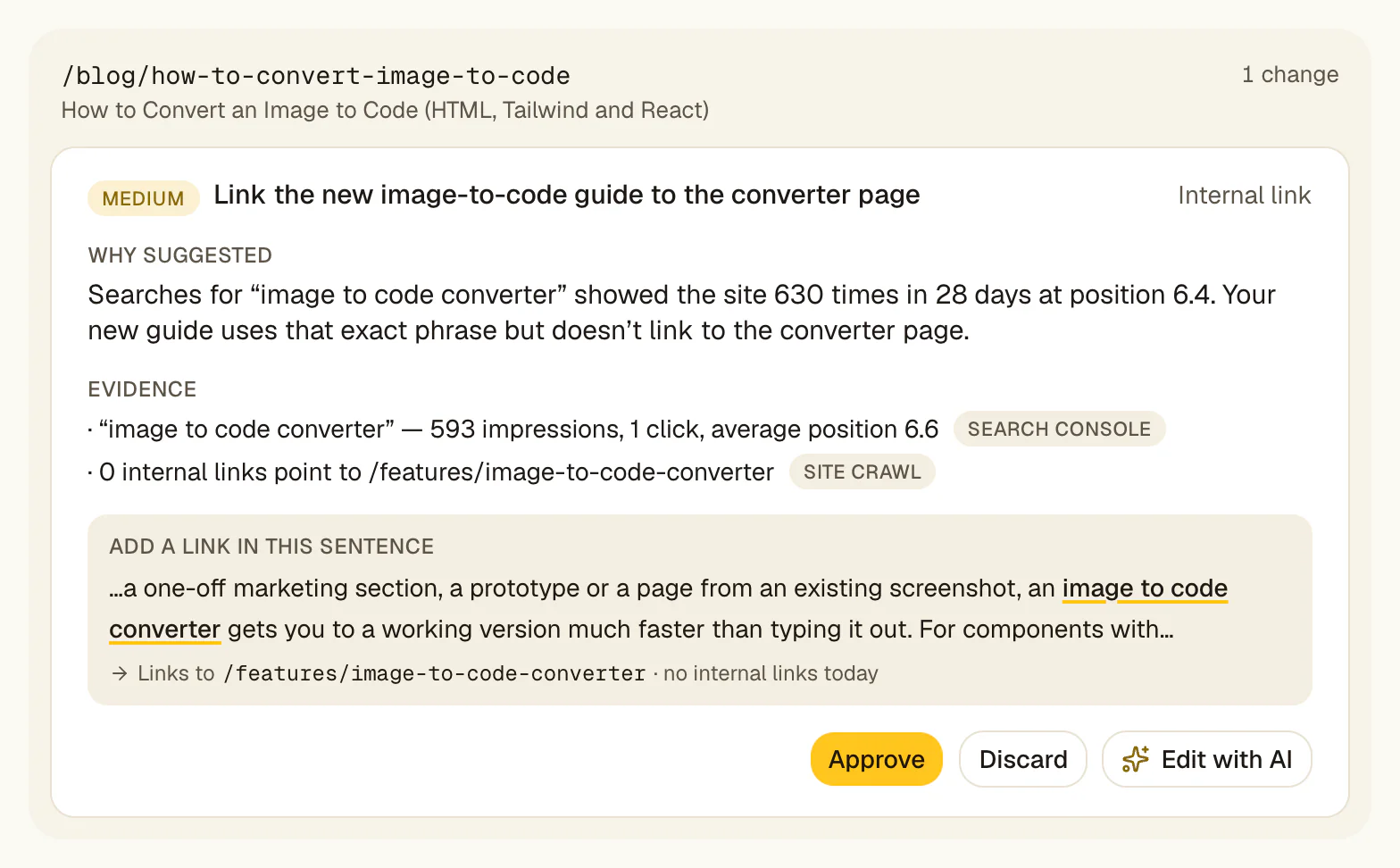
Not "your title is too long". The rewritten title, the new meta description, the schema block, the internal link with its anchor text and destination — with the Search Console evidence that prompted it attached.
You approve, it ships
Approve, edit or discard each proposal. Approved changes are written to WordPress through the plugin, each with a Change Log entry, and most can be reverted there.
What is SEO automation software?
SEO automation software is software that runs repetitive search optimization tasks without someone doing them by hand: crawling for technical faults, tracking rankings, clustering keywords, generating reports and, increasingly, drafting the content changes those tasks imply.
It is worth being precise about which tasks are genuinely automatable. Anything with a deterministic right answer is: finding broken internal links, detecting missing canonical tags, spotting pages that dropped out of the index, validating schema, monitoring Core Web Vitals. These have no judgement component and no reason to involve a person.
Tasks with a judgement component are a different category: whether a page should target a different query, whether two posts should merge, whether a claim in your copy is still true. Software can draft these well and should not ship them unreviewed.
The useful dividing line is not "can a machine do this" but "what does it cost if the machine is wrong". A wrong broken-link report costs nothing. An auto-published rewrite of your pricing page that is wrong costs a great deal.
What can you actually automate in SEO?
Fully automatable, no review needed: crawling and technical monitoring, index coverage alerts, rank tracking, Core Web Vitals monitoring, sitemap generation, broken link detection, schema validation and reporting. These are measurement problems.
Automatable to a draft, then reviewed: title tags and meta descriptions, schema markup, internal links, content refreshes on existing pages, redirects for merged pages, and keyword-to-page mapping. A machine can produce a good first version of each; a person should see it before it goes live.
Not sensibly automated: your content strategy, judging whether a topic fits your business, anything that depends on your own experience or data, outreach relationships, and any change to pages where being wrong is expensive — pricing, legal, product claims.
Most tools sold as SEO automation software sit entirely in the first group. The second group is where the hours actually go, and it is the one RankHive is built for.
How to choose SEO automation software
No single tool wins everywhere, because the types in the table above do different jobs. Five questions narrow it down quickly.
Does it use your data or an estimate? Tools built on a third-party index estimate your traffic and positions. Search Console reports what Google actually recorded. For improving pages you already have, measured data beats estimated data, and the difference is often large.
Does it end at a report or at a change? This is the question that separates categories. If the output is a PDF or a dashboard, you have bought a research tool and the implementation work is still yours.
Is there an approval gate? Tools that publish automatically are fast and occasionally catastrophic. Tools with no automation at all are safe and slow. The useful design is automated drafting with human approval — and you should check that the approval step is real rather than a settings toggle nobody uses.
Can you undo it? Any software with write access to your site needs a change log and a rollback. If a vendor cannot tell you how to reverse a change it made, that is your answer about giving it write access.
What does it cost relative to the work it removes? Judge an SEO automation platform against the hourly cost of the work it replaces, not against other software. A cheap tool that only adds rows to a backlog can cost more than it saves.
SEO automation platform vs SEO automation tools
The two phrases get used interchangeably and describe different purchases. A tool does one job: a rank tracker, a crawler, a schema generator. A platform bundles several behind one login, one dataset and one bill.
Tools win on depth and price. If the only thing between you and better rankings is that nobody has crawled the site in a year, a crawler solves that for a fraction of a platform’s cost, and does it better.
Platforms win on continuity. The advantage is not that any one module is stronger — usually it is not — but that findings persist across modules and over time. A ranking drop can be lined up against a crawl error and a content change on the same date without exporting three CSVs.
The mistake to avoid is buying a platform for one module: paying platform prices, using the rank tracker and ignoring the other six tabs. If you can name the single job you need done, buy the tool that does it.
RankHive is deliberately narrow. Its main job is turning Search Console signals into approved WordPress changes, plus drafting articles for keywords you pick. It expects you to keep a research tool alongside it if you need competitor or backlink data.
What an auto SEO tool should never do on its own
The obvious version of an auto SEO tool is the dangerous one: detect a problem and fix it immediately, with nobody in the loop. It demos beautifully and fails in ways that are expensive and slow to notice.
The failure is rarely dramatic. A rewritten title that drops a product name your customers search for. A schema block asserting a rating you do not have. An internal link injected into a sentence where it makes no sense. Each is small, each looks fine in a diff, and together they erode a site while every dashboard stays green.
An approval gate costs you a read and a click per change and removes that whole class of problem. You see the proposed edit, the evidence behind it and the page it affects. You approve, adjust or decline.
The trade is real: an approval model is slower than auto-publishing, and it needs you to show up weekly. If nobody will ever review anything, you want a tool with narrower write permissions, not a faster one.
How SEO automation software differs from an SEO plugin
Yoast and Rank Math are excellent at what they do, and what they do is different. A plugin gives you the fields — a place for a title, a description, a canonical, a schema block — and tells you whether what you typed looks reasonable against your focus keyword.
Some plugins also show how pages perform in Google. Rank Math’s free Analytics module, Yoast’s dashboard through Site Kit and SEOPress PRO’s columns put Search Console clicks, impressions and positions inside WordPress. Their AI features write a title or description for the posts you pick. Reading those numbers across every page and deciding which ones to change is still your job.
SEO automation software takes that job. It reads performance data, decides which pages are worth changing, works out what the change should be, and writes it into the fields the plugin manages.
They are complementary rather than competing. RankHive works alongside Yoast, Rank Math or SEOPress and writes into their fields (All in One SEO isn’t supported yet). For a side-by-side of the plugins themselves, see Rank Math vs Yoast vs AIOSEO vs SEOPress in the related reading below.
Are there free SEO automation tools?
For monitoring, yes, and they are good. Google Search Console covers performance and index monitoring with email alerts. Bing Webmaster Tools adds a second index. Screaming Frog crawls up to 500 URLs free. Looker Studio automates the reporting layer over Search Console data. Together that is a genuine free automation stack for detection.
For implementation, no — and this is the consistent gap. Free tools tell you what is wrong with impressive precision and then stop at a dashboard.
That asymmetry exists because detection is cheap to run and implementation carries risk. Nobody wants to give away write access to your site, and the tools that ask for it should earn it with an approval step and a revert button.
If your budget is zero, the right stack is Search Console plus Screaming Frog plus a Looker Studio dashboard, with the fixes done by hand. That works. It simply requires the hand.
Does automated SEO actually work?
For technical and on-page work on a site with existing traffic, yes, and the reason is unglamorous. Most sites have a long tail of known, small, unfixed problems. Automation works because it closes that gap consistently, not because any single change is clever.
It works much less well in two situations. On a brand-new site with no Search Console history there is nothing to analyse; the bottleneck is publishing anything at all. And in genuinely competitive commercial results, on-page work is rarely the binding constraint — those are usually decided by links and brand, which no automation tool will produce for you.
Be sceptical of any tool promising automated ranking improvements without reference to your starting position. What automation reliably delivers is that the improvements you already know about actually happen.
Can you automate local SEO?
Partly. The data-consistency parts automate cleanly: monitoring business details across directories, watching for duplicate listings and tracking rankings by location.
The parts that differentiate a local business do not. Review replies need to sound like a person who works there, and local landing pages need details a template cannot invent. A tool that offers to generate fifty location pages is offering you thin content, not a shortcut.
RankHive does not manage Google Business Profile or directory listings. On a local business’s WordPress site it works on the posts and pages, such as service pages and FAQs that already get impressions.
Use cases
Two hundred posts, decent Search Console impressions, no time to audit anything and a list of known issues from six months ago.
A weekly batch of drafted fixes ranked by impact. Your approvals replace an audit nobody was going to run.
Each client needs upkeep that is unbillable in isolation but visible when neglected.
Routine fixes drafted per site (one subscription each), approved in a batch, each with a Change Log entry you can show the client.
Old posts still bring in impressions, but nothing new has gone out in months because nobody knows which keywords are winnable.
Keyword ideas with search volume and difficulty, and up to 16 drafted articles a month for the ones you pick, each waiting for approval.
Responsible for organic performance, no specialist on the team, and an agency quote that does not fit the budget.
A weekly cadence with evidence attached to every change — enough to run on-page SEO properly without hiring for it.
When this is the wrong tool
Your site is not on WordPress. RankHive writes through a WordPress plugin. There is no workaround for other platforms today, and we would rather say so than take your money.
Your site is new and has no Search Console history. Everything here reasons from impression and position data. With nothing to read, there is nothing to prioritise — write and publish first.
You need competitor research, backlinks or rank tracking. RankHive has no link index or rank tracker and is not trying to build one. Pair it with Ahrefs Webmaster Tools (free) or keep a research subscription.
You need page speed work, local listings or WooCommerce product pages edited. RankHive flags Core Web Vitals but does not fix hosting or themes, does not manage Google Business Profile, and works on posts and pages, not products.
Nobody will ever review a proposal. The approval gate is the design. If it goes unattended, nothing ships and you are paying for a queue.
Common objections
Will it publish something I did not sign off?
No. Every change waits for approval, each one gets a Change Log entry, and most can be reverted. There is no setting that grants blanket write access.
Does this replace my SEO plugin?
No. Your SEO plugin manages the fields; RankHive decides what should go in them based on performance data. It writes into Yoast, Rank Math or SEOPress, whichever you run. All in One SEO isn’t supported yet.
What if the drafted change is wrong?
Reject or edit it. The proposal shows the Search Console evidence behind it, so you can judge the reasoning rather than just the wording.
Is this AI writing slop into my site?
It drafts targeted changes to existing pages — a title, a description, a schema block, a section — with a specific query and its impression data as justification. New articles are written only for keywords you pick, and nothing publishes without you.
Capabilities
Approval before every write
No change reaches your site without explicit sign-off. There is no auto-publish mode.
Change log and rollback
Every shipped change is recorded, and most can be reverted from the Change Log.
Weekly, not constant
One audit a week. Enough to keep pace, rare enough to actually review.
Frequently asked questions
What is SEO automation software?
Software that runs repetitive SEO tasks without manual effort: crawling for technical faults, tracking rankings, validating schema, generating reports and, in some cases, drafting the changes those findings imply. Most tools in the category stop at reporting; the thing to check before you buy is whether the output is a list of problems or a set of drafted fixes.
Which SEO automation software should I choose?
It depends on the job. For keyword and competitor research, an all-in-one platform such as Semrush or Ahrefs. For crawling, Screaming Frog or Sitebulb. For a WordPress site with Search Console history where the problem is that fixes never get made, RankHive drafts them weekly and ships the ones you approve. Many sites use one research tool plus one tool that implements.
What is an SEO automation platform?
A product that bundles several automated SEO jobs — research, rank tracking, audits, reporting — behind one login and one dataset. Platforms win on continuity across those jobs; single-purpose tools usually win on depth and price.
What does an auto SEO tool actually do?
It depends on the tool. Some only monitor and report, some score content as you write, and some publish AI articles on a schedule. RankHive reads your Search Console data every week, drafts specific fixes for your existing pages plus articles for keywords you pick, and writes them to WordPress only after you approve each one.
What can and cannot be automated in SEO?
Anything with a deterministic answer can be fully automated: crawling, index monitoring, rank tracking, schema validation, broken link detection, reporting. Titles, meta descriptions, schema, internal links and content refreshes can be automated to a draft and then reviewed. Strategy, topic selection, anything drawing on your own experience, and changes to pricing or legal pages should not be automated at all.
Is automated SEO safe?
It depends on whether there is an approval gate. Auto-publishing tools fail quietly — a rewritten title that drops a term customers search for, or schema asserting a rating you do not have. Automated drafting with human approval gets the speed without that risk, and any tool with write access should also give you a change log and a rollback.
How much does SEO automation software cost?
From free monitoring tools to several hundred dollars a month for platform plans. RankHive is $49.99 a month (or $499.99 a year) for one WordPress site. Compare any tool against the hourly cost of the work it removes — a tool that only produces reports leaves the expensive half of that work with you.
Does SEO automation replace an SEO plugin like Yoast or Rank Math?
No. A plugin owns the fields — title, description, canonical, schema — and validates what you enter; some, like Rank Math’s free Analytics module, also show your Search Console numbers. Automation software decides which pages to change and what belongs in their fields based on how they perform in Google, then writes it through your plugin. RankHive works with Yoast, Rank Math and SEOPress; All in One SEO isn’t supported yet.
Does RankHive work on any website?
No. It works on WordPress sites (WordPress 6.5+, PHP 8.1+) where you can install a plugin, and it edits posts and pages. Shopify, Webflow and other platforms are not supported, and WooCommerce product pages are not edited yet.
Connect WordPress → see your first SEO fixes
Setup takes under ten minutes. Your first audit starts the moment you subscribe.