

Search "SEO agent" in 2026 and you will find forty products with the same pitch: AI-powered, autonomous, revolutionary. Click through and most of them do one thing — generate blog posts. Sometimes they auto-publish. Sometimes they add a chat interface that answers "what keywords should I target?" and leaves you to do the work anyway.
That is not an agent. That is a content mill with agent branding.
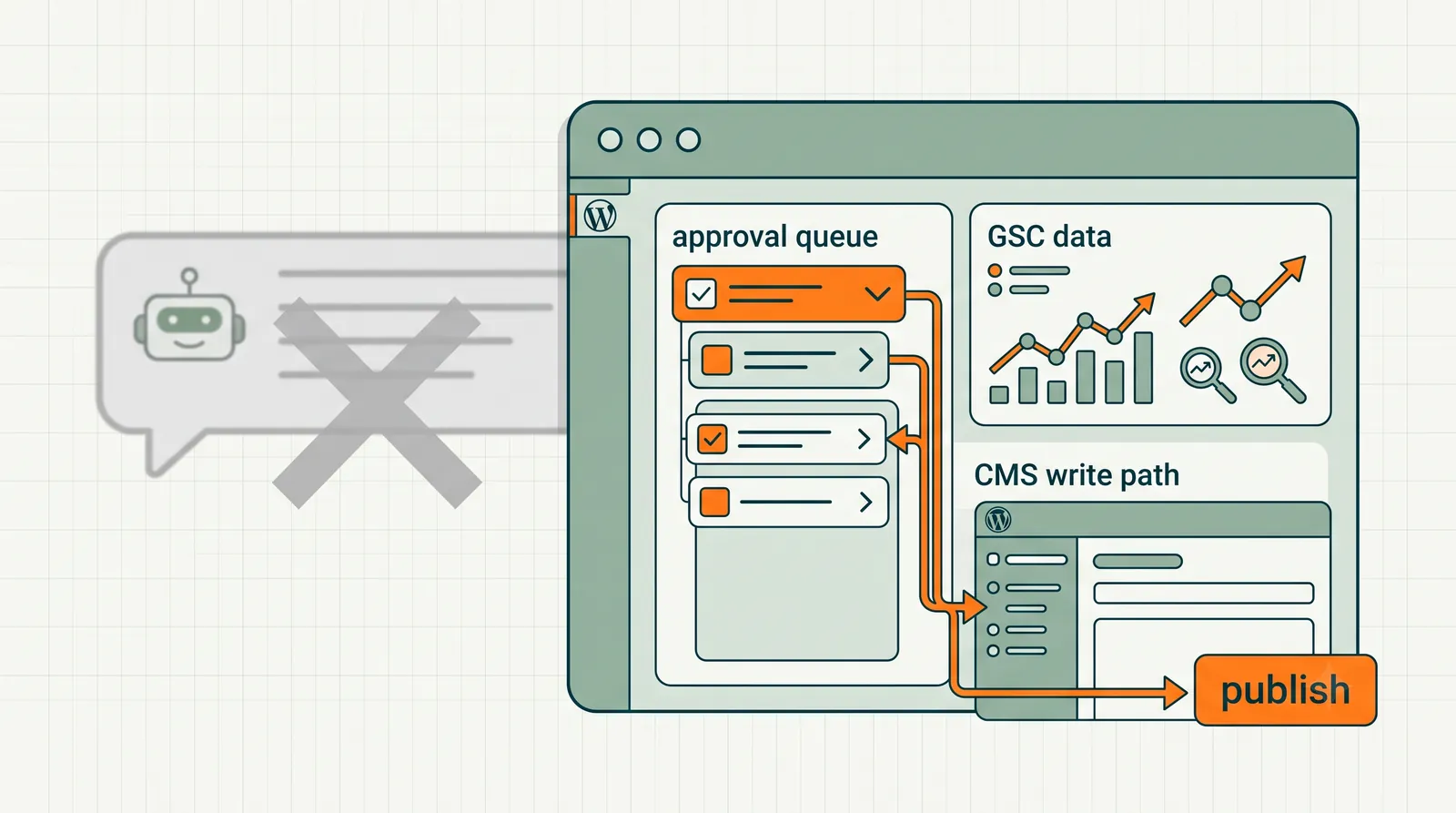
A real SEO agent for WordPress does something more specific and more valuable: it runs the optimization loop on your existing pages. Reads Google Search Console. Finds the query where you rank position 9 with 700 impressions. Drafts the new title tag. Waits for your approval. Writes it to WordPress. Logs the change. Checks results two weeks later.
Not a chatbot. Not a keyword spreadsheet. Not a 30-posts-per-month publisher. An agent — in the software sense — that perceives (GSC data), decides (prioritization), acts (drafts and ships), and learns (tracks outcomes).
This guide is the filter. How to evaluate SEO agents for WordPress, what the real architecture looks like, why long-tail optimization is the killer use case, and where RankHive's feature set fits for publishers who want the loop closed — not another writing assistant.
Last updated: July 17, 2026.
TL;DR
- A real SEO agent for WordPress optimizes existing pages from performance data — it is not primarily a blog post generator.
- The loop: GSC connect → weekly opportunity scan → draft specific fixes → human approval → WordPress REST API ship → change log.
- Long-tail and striking-distance queries are the highest-ROI agent use case — impressions exist, fixes are small, results come fast.
- Generic "AI SEO" tools fail the agent test if they do not connect to your CMS and ship changes after approval.
- RankHive feature set: AI SEO Agent, WordPress SEO Automation, Approval Workflow, How RankHive Works, SEO Autopilot.
- Keep Rank Math or Yoast for technical SEO. The agent sits on top.
The agent test: five questions
Before calling anything an SEO agent, ask:
1. Does it read your Search Console data? Without real performance data, "optimization" is guesswork. Agents prioritize by your impressions and positions — not generic keyword volume estimates.
2. Does it draft specific artifacts? "Improve your title tag" is a recommendation. A proposed new title is a draft. Agents produce finished work products.
3. Does it connect to WordPress? An agent that ends in a PDF or a chat response leaves the hardest step — shipping — on you. WordPress REST API integration is non-negotiable for a WordPress SEO agent.
4. Does it require approval before shipping? Auto-publish agents optimize for output volume. Approval-gated agents optimize for outcomes without brand risk. For production WordPress sites, approval is architecture — not an optional setting.
5. Does it close the feedback loop? After a change ships, does the system track position and CTR movement? Agents learn; chatbots forget.
If a product fails two or more of these, it is marketing an agent, not building one.
Generic "SEO agents" vs WordPress-native agents
| Generic AI SEO | WordPress SEO agent |
|---|---|
| Writes new blog posts | Optimizes existing pages |
| Keyword research chat | GSC query-level prioritization |
| Auto-publish optional/default | Approval required |
| No CMS integration | REST API read/write |
| Content volume metrics | Position/CTR outcome metrics |
| Works for any platform (poorly) | WordPress-specific field mapping |
The generic category exploded because content generation is demo-friendly. "Watch AI write a blog post in 30 seconds" sells in a landing page video. "Watch AI rewrite a title tag based on position-9 query data and ship it after approval" is less flashy and more useful for established WordPress sites.
Most WordPress publishers do not need 30 more posts. They need their 200 existing posts optimized.
What a WordPress SEO agent actually automates
Six change categories cover the majority of agent work on WordPress sites.
Title tag rewrites. For striking-distance queries (positions 5–15). Front-load query, add specificity, improve CTR hook. Highest frequency proposal type.
Meta descriptions. For pages with impressions and weak or missing metas. Outcome-first, 150–160 characters.
Content additions. 150–300 word H2 sections addressing gaps vs top-ranking competitors. Not full rewrites — surgical additions.
FAQ blocks with schema. For posts ranking on question-style queries without structured Q&A. GEO and traditional SEO benefit.
JSON-LD schema fixes. Missing, invalid, or incomplete schema detected via validation. Agent drafts corrected markup.
Internal links. Contextual links from high-impression sources to striking-distance targets. Anchor text and placement drafted.
Each category maps to a feature of the RankHive stack:
- Discovery and drafting → AI SEO Agent for WordPress
- Full automation loop → WordPress SEO Automation
- Safety gate → WordPress SEO Approval Workflow
- Product mechanics → How RankHive Works
- Positioning and cadence → SEO Autopilot
Long-tail: where WordPress SEO agents win hardest
Head terms ("email marketing," "wordpress seo") are competitive, slow, and often wrong targets for small sites. Long-tail queries — specific, lower-volume, higher-intent — are where WordPress agents deliver disproportionate value.
Why long-tail fits the agent model:
Impressions exist without rankings. Your site already ranks positions 6–20 for hundreds of long-tail variants. GSC shows them. Nobody is manually optimizing each one.
Fixes are small. A title tweak and 150 words of content can move position 11 to position 4 on a long-tail query. You do not need a 3,000-word new post.
Results are fast. Long-tail competition is weaker. Changes show in 14–30 days, not six months.
Volume adds up. Two hundred long-tail queries at position 8, each moving to position 3, often beats one head term in total traffic — especially for commercial intent long-tails.
WooCommerce is long-tail native. Product pages rank on SKU variants, use-case modifiers, and comparison queries. Thousands of opportunities. Zero manual bandwidth.
A WordPress SEO agent scans this long tail weekly, ranks by impressions, drafts fixes for the top opportunities, and queues them for approval. You are not choosing keywords from a database. You are acting on keywords Google already associates with your site.
The weekly agent cadence (what actually happens)
Monday (automatic). Agent completes weekly pass on connected Search Console + WordPress data. New proposals appear in queue.
Tuesday (15–25 minutes). You review proposals. Typical queue: 8–20 items for a site with 100–300 indexed pages. Approve title rewrites that match voice. Edit metas that are close. Reject internal link suggestions that feel forced.
Tuesday (automatic, post-approval). Approved changes ship to WordPress. Change log updates.
Wednesday–Sunday. Agent monitors no further action required. You live your life.
Following Monday. New pass incorporates updated GSC data. Previous changes enter measurement window.
Day 14–30. Check position movement on shipped changes. Agent surfaces outcome data where available.
Total human time: ~20 minutes per week. Versus 4–6 hours manual Search Console → WordPress workflow. That is the agent value proposition — not replacing your judgment, replacing your data entry.
Agent vs chatbot vs plugin (the stack clarity)
Three layers. Different jobs. No single tool does all three well.
SEO plugin (Rank Math, Yoast). Technical foundation. Sitemaps, canonicals, schema templates, redirect manager. Configures the site. Does not decide what to optimize based on performance.
Chatbot (ChatGPT, Claude). Answers questions. Drafts copy when asked. Does not read your GSC. Does not prioritize. Does not ship to WordPress without manual paste.
SEO agent (RankHive). Performance-driven optimization loop. GSC data in, approved changes out. Sits on top of the plugin. Uses AI for drafting, not for conversation.
The mistake is expecting any one layer to substitute for another. The stack works when each tool does its job.
Who should use a WordPress SEO agent
Strong fit:
- WordPress blogs with 50–500 posts and established GSC history
- WooCommerce stores with large product catalogs
- Agencies managing multiple WordPress client sites
- Publishers who tried manual SEO cadence and could not sustain it
- Sites post-helpful-content-update that need optimization over volume
Weak fit:
- Brand-new sites with no GSC data yet (optimize foundations first)
- Publishers who want 50 AI posts per month auto-published
- Sites on platforms other than WordPress (agent needs CMS integration)
- Teams with zero bandwidth for even 20 minutes weekly review
The honest constraint: agents still need a human in the loop. If 20 minutes weekly is too much, the problem is priorities — not tooling.
Who should not use a generic content agent instead
If your strategy is "publish more content to rank," a blog-writing AI might help — with editorial review, quality control, and realistic expectations about Google's useful content systems.
If your strategy is "get more traffic from what I already have published," a WordPress SEO agent is the right category. Most established sites are sitting on unoptimized libraries. The agent unlocks existing assets. Content mills create new liabilities.
Evaluating vendors: red flags and green flags
Red flags:
- "Publish 100 posts per month on autopilot" as primary value prop
- No Google Search Console integration
- No WordPress plugin or API connection
- Auto-publish enabled by default
- No change log or rollback
- "Works for any CMS" without WordPress-specific field mapping
- Agent = chat interface only
Green flags:
- GSC OAuth as core data source
- Proposal queue with evidence (query, position, impressions)
- Approval required before production writes
- Specific change types (title, meta, schema, links — not just "optimize page")
- Change log with before/after states
- Explicit positioning alongside SEO plugins, not replacing them
- WooCommerce and multi-site support for agencies
The RankHive feature map (all pages, one stack)
For readers comparing options, here is how RankHive's feature pages divide the story:
| Feature page | What it covers |
|---|---|
| AI SEO Agent for WordPress | Agent definition, capabilities, agent vs chatbot vs plugin |
| WordPress SEO Automation | Full loop: connect, discover, draft, approve, ship |
| WordPress SEO Approval Workflow | Safety model, queue mechanics, rollback, agency workflows |
| How RankHive Works | Plain-English product explainer, setup steps, data security |
| SEO Autopilot | Positioning: mechanical work automated, decisions human |
Start with How RankHive Works if you want the overview. Read AI SEO Agent for WordPress if you are evaluating the category. Read WordPress SEO Approval Workflow if your primary concern is safety.
The content mill trap (why generic agents peaked in 2024)
2024–2025 saw an arms race: who could publish the most AI posts per month. WordPress site owners bought tools, auto-published hundreds of thin articles, and wondered why traffic flatlined or dropped after the next helpful content update.
The generic SEO agent category rode that wave. "Agent" meant "autonomous publisher." WordPress was the deployment target because REST API publishing is easy. Quality control was the customer's problem.
The correction in 2026 is category split: content production AI vs optimization agents. Know which you are buying. If the demo shows a full article appearing in wp-admin, you are looking at production AI. If the demo shows a queue of title and meta diffs with GSC evidence, you are looking at an optimization agent.
Long-tail math: why 200 small wins beat one big bet
Concrete example for a WordPress SaaS blog:
- Head term "project management software" — 90,000 monthly searches, position 45, not moving
- Long-tail "project management for remote design teams" — 320 monthly searches, position 11, 280 impressions in GSC
Moving the long-tail from 11 → 4 might add 40–80 clicks/month. Modest in isolation.
Now multiply: if your site has 150 long-tail queries in striking distance with similar profiles, 150 × 50 clicks = 7,500 monthly clicks from optimization alone. No new posts. No head-term fantasy.
That math is why WordPress SEO agents focus on GSC long-tail — the opportunities already exist on your domain. Generic agents that pull keywords from third-party databases target theoretical volume you may never rank for.
Security and access: what a real agent needs
WordPress SEO agents need scoped API access: read post content, read/write SEO meta fields, insert content blocks. They do not need:
- Admin user creation
- Plugin installation permissions
- Database direct access
- File system write beyond media (usually not needed for on-page SEO)
Evaluate vendors on OAuth and application-password scoping. If setup requires sharing your wp-admin password, stop.
RankHive uses the plugin pairing handshake documented in the product — HMAC-validated connection, scoped writes tied to approved proposal IDs. See How RankHive Works for the security model.
Getting started (practical path)
Week 0: Fix technical SEO in Rank Math. Verify GSC connection. Confirm sitemap and indexation are clean.
Week 1: Connect RankHive — GSC OAuth + WordPress plugin. Wait for first proposal queue (typically within 24 hours).
Week 2: Review first queue. Approve 5–10 low-risk changes (metas, striking-distance titles). Observe shipping and change log.
Week 3–4: Expand approvals. Add content additions and internal links. Establish weekly review habit.
Day 30: Compare GSC metrics on shipped URLs vs baseline. Adjust strategy based on what moved.
Do not try to approve 50 changes in week one. Build trust in the system with small batches. Expand as output quality proves consistent.
The WordPress SEO agent workflow (step by step)
A real agent closes a loop humans rarely sustain manually. Here is the full WordPress-native workflow, mapped to RankHive's feature stack.
| Phase | What happens | Human time | Feature reference |
|---|---|---|---|
| Connect | GSC OAuth + WordPress plugin pairing | 15 min (once) | How RankHive Works |
| Discover | Weekly GSC scan surfaces opportunities | 0 min (automatic) | AI SEO Agent |
| Draft | Agent produces title, meta, schema, link, content diffs | 0 min (automatic) | WordPress SEO Automation |
| Approve | You review evidence + diffs in queue | 15–25 min/week | Approval Workflow |
| Ship | Approved changes write to WordPress via REST API | 0 min (automatic) | WordPress SEO Automation |
| Verify | +14 / +30 day position and CTR check | 5 min/month | SEO Autopilot |
Connect (week 0). Install the RankHive WordPress plugin. Complete the pairing handshake from wp-admin. Authorize Google Search Console. Confirm Rank Math or Yoast handles technical SEO (sitemaps, canonicals). The agent sits on top — it does not replace your plugin.
Discover + draft (every Monday). The agent reads your actual GSC data: queries, impressions, positions, CTR. It prioritizes striking-distance and high-impression/low-CTR pages. It drafts specific artifacts — not recommendations, finished copy.
Approve (Tuesday). Open the queue. Each proposal shows evidence: the query, position, impressions, current field value, proposed value. Approve, edit, or reject. Rejections teach the system your preferences over time.
Ship (automatic post-approval). Changes write to the correct WordPress fields with optimistic-lock preconditions. Change log records before/after. No wp-admin copy-paste.
Verify (day 14–30). Compare GSC metrics on shipped URLs against baseline. Feed results into next week's prioritization.
For the category-level definition of agentic SEO beyond WordPress, read the What Is Agentic SEO? pillar. For striking-distance mechanics inside the discover phase, see Striking Distance Keywords for WordPress.
Case study: 220-post publisher replaces Sunday GSC sessions
A solo WordPress publisher ran a niche finance blog with 220 posts and 9,400 monthly GSC clicks. Every Sunday for two years, they exported Search Console data, built a spreadsheet queue, and shipped three to five fixes before losing steam.
The old workflow. Sunday 90-minute session: GSC export, manual prioritization, draft titles in a Google Doc, Monday evening wp-admin session to paste changes. Average shipped fixes: 4.2/week. Striking-distance backlog grew every quarter.
Week 1 with agent. Connected GSC + WordPress plugin. First queue: 17 proposals. Publisher approved 12 in 23 minutes (rejected 5: two cannibalization risks, three off-brand tone). All shipped by Tuesday.
Weeks 2–8. Average weekly queue: 14 items. Approval time stabilized at 19 minutes. Shipped changes: 89 over eight weeks (vs. 34 in the prior eight weeks manual). Change log replaced the spreadsheet entirely.
Results at 60 days. Eleven long-tail queries moved from positions 8–14 to positions 3–6. Aggregate monthly clicks rose 14% with zero new posts published. The publisher reclaimed six hours/month previously spent on data entry.
What they kept doing manually. Quarterly content strategy. External link outreach. New pillar post planning. The agent handled the recurring optimization layer — the work that was always "important but never urgent."
That is the distinction this guide makes: a WordPress SEO agent optimizes the library you have. A generic content agent adds to the library whether you need it or not.
Frequently asked questions
Is an SEO agent the same as an AI SEO writer?
No. AI writers create new content. SEO agents optimize existing pages from performance data. Different orientation, different output, different risk profile.
Does a WordPress SEO agent replace my SEO plugin?
No. Keep Rank Math or Yoast for technical SEO. The agent handles the weekly performance optimization loop.
Can the agent publish without my approval?
RankHive cannot. Approval is architectural. Evaluate any vendor that offers auto-publish as default with extreme skepticism.
What about long-tail keywords the agent has never seen?
The agent works from GSC data — queries Google already shows your site for. It does not invent keyword targets from external databases. That is a feature: you optimize for real opportunities, not theoretical ones.
How is this different from Semrush or Ahrefs automation?
Enterprise SEO platforms excel at research and reporting. Most stop before shipping changes to WordPress. Agents close the last mile: draft + approve + write to CMS.
Is agentic SEO only for large sites?
No. Sites with 50+ indexed pages and six months of GSC history benefit. Smaller sites should fix foundations first, then add the agent layer.
Can agencies use one agent for multiple WordPress clients?
Yes — with per-site queues, per-site approval, and exportable change logs. Multi-site is a core agency use case.
How long until I see results from a WordPress SEO agent?
Title and meta changes on striking-distance pages often show CTR movement in 7–14 days. Position shifts typically take 14–30 days. The agent compounds — week 8 results exceed week 2 because shipped fixes stack on an improving baseline.
Related reading
- SEO AI Agent: What It Is and How It Works
- What Is Agentic SEO?
- SEO Automation Without Auto-Publishing
- Rank Math and RankHive Together
- Striking Distance Keywords for WordPress
RankHive is the SEO agent for WordPress that reads your Search Console, drafts on-page fixes, and ships them after you approve. Not a content mill. Not a chatbot. An agent that does the work. Try RankHive and see real proposals from your data within 24 hours.