


WooCommerce powers over 30% of all ecommerce stores globally. Most of those stores are leaving significant organic search traffic on the table — not because their products are not good, but because WooCommerce creates specific SEO challenges that generic WordPress advice does not address.
Product pages, category pages, attribute archives, pagination, product variations, and schema markup all work differently for ecommerce than for a standard blog. This guide covers all of it, with specific steps for each category of WooCommerce SEO work.
Last updated: June 6, 2026.
TL;DR
- WooCommerce's biggest SEO issues: index bloat from attribute archives and pagination, thin product descriptions, and missing schema for products, reviews, and breadcrumbs.
- Fix priority order: index structure → product descriptions → schema → category pages → site speed.
- Rank Math Pro (not free) or Yoast SEO for WooCommerce (paid add-on) are required for WooCommerce-specific schema. The free tiers do not cover all product schema types.
- Category pages rank better than product pages for most ecommerce queries. Optimize them first.
- WooCommerce product pages need unique descriptions — copy from manufacturers or duplicate descriptions across variants will not rank.
The WooCommerce SEO landscape: what you are competing for
WooCommerce stores compete in two types of search results: organic blue links and Google Shopping (product listings). This guide covers organic SEO — the blue links — because that traffic is free and compounding, whereas Shopping requires ad spend.
For most product categories, the organic search landscape looks like this: large marketplaces (Amazon, Walmart, Target) dominate the top positions for broad, high-volume queries. Below them: category-level pages from established retailers. Below those: individual product pages, comparison guides, and content from smaller specialized stores.
The strategic implication for smaller WooCommerce stores: broad product queries ("best running shoes") are nearly unwinnable against Amazon and major retailers. The winning approach is specificity — ranking for longer-tail product queries ("best zero-drop trail running shoes for wide feet") where your expertise and specificity beats generic retailer breadth.
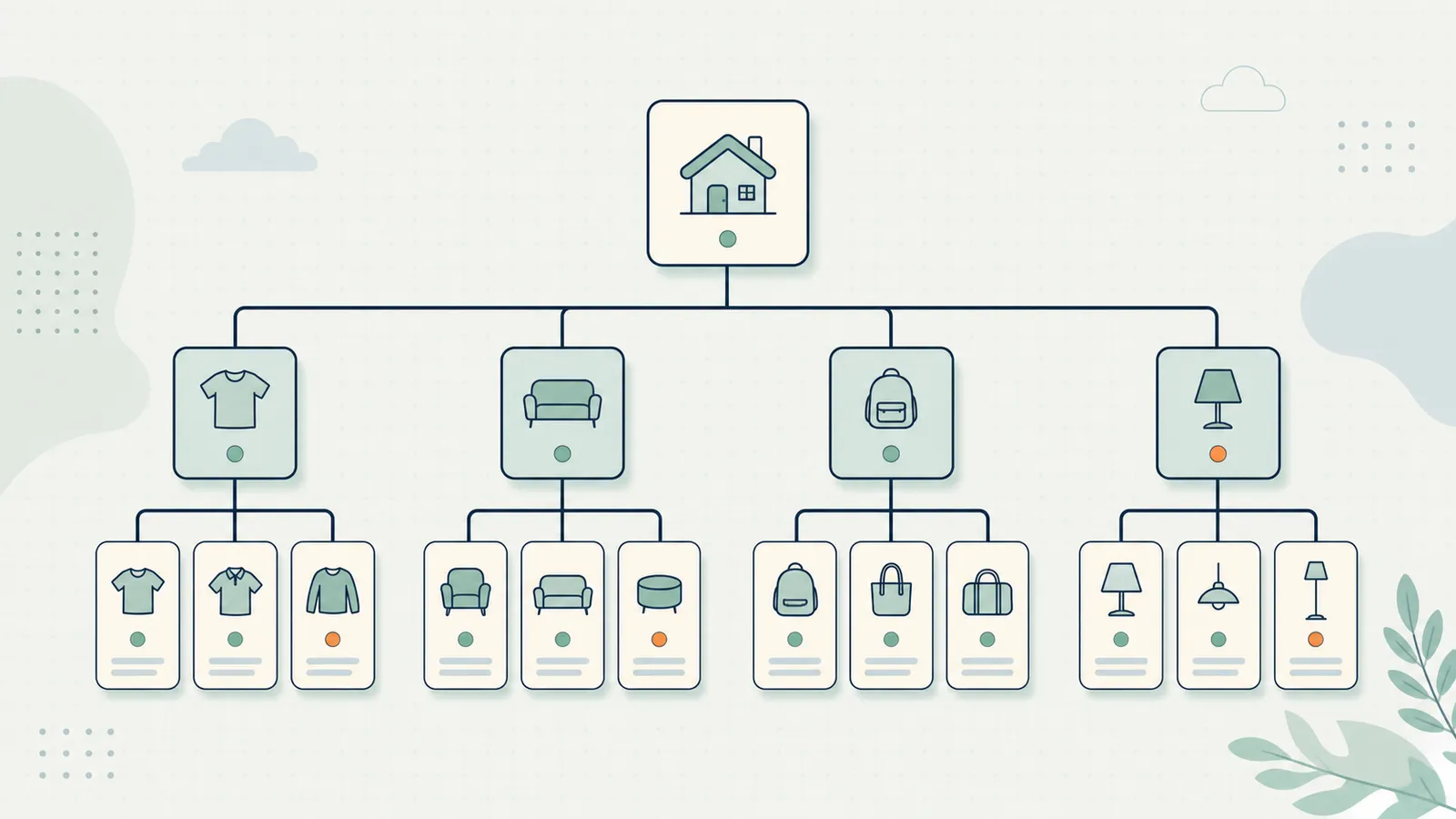
The WooCommerce site architecture: what to index and what not to
WooCommerce's default URL structure creates a large number of indexable URLs, many of which add no value for SEO and dilute the crawl budget.
Default WooCommerce URL types:
- Product pages:
/product/product-name/— index these - Category pages:
/product-category/category-name/— index these - Tag archive pages:
/product-tag/tag-name/— usually noindex - Attribute archive pages:
/pa_color/blue/,/pa_size/xl/— almost always noindex - Paginated category pages:
/product-category/shoes/page/2/— noindex beyond page 2-3 - Product variation URLs — these are usually handled as canonical to the parent product, but confirm
- Shop base page:
/shop/— index this
The highest-impact fix for most WooCommerce stores: noindex all attribute archive pages. A store with 50 products and 10 attributes (color, size, material, style, etc.) can generate hundreds of thin attribute archive URLs, each with a partial list of products. These are rarely helpful to users and waste crawl budget on near-duplicate content.
Fix with Rank Math: Go to Rank Math → Titles & Meta → WooCommerce. Look for "Product Attributes" and set them to No Index. For each attribute type (Color, Size, etc.), configure the noindex setting.
Fix with Yoast + WooCommerce add-on: Yoast SEO → Search Appearance → Taxonomies → Product attributes. Set "Show product attributes in search results" to off.
Product page SEO: the exact elements to optimize
Product pages are the most important pages on your WooCommerce store, but they are also the hardest to rank for competitive queries. Focus on these elements.
Product title and H1
The product title becomes the H1 tag on the page. It should:
- Lead with the most important keyword (usually the product name + category + key attribute)
- Include what makes it specific ("Women's Merino Wool Running Socks — Low Ankle, 3-Pack")
- Not use manufacturer codes or internal SKUs as the primary title — use the name a customer would search for
Product description (the critical element)
Most WooCommerce stores have thin product descriptions — either copied from the manufacturer, left at a single sentence, or duplicate across color/size variations.
Thin product descriptions are the most common reason WooCommerce product pages fail to rank. Google's systems compare your product description quality to competitor pages. If yours is shorter, less specific, and contains less original information, you rank lower.
What a good product description includes:
- The key benefit in the first sentence (not "this product features..." but "designed for X who want Y")
- 2-3 specific features explained in terms of benefits, not specs alone
- Who the product is for (and who it is not for)
- One or two pieces of social proof — specific reviews, notable use cases
- 200 to 400 words minimum for most products; longer for complex or high-consideration products
The short description: WooCommerce has a "short description" field (shown near the add-to-cart button) and a long description (below the fold). The short description should focus on the key purchase trigger — the one thing that makes this the right choice. The long description covers the full detail.
Product images and alt text
Every product image should have descriptive alt text. Format: "[Product Name] — [Key attribute] — [Relevant keyword if natural]." For a shoe product: "Brooks Ghost 15 Running Shoe — Women's, Midnight Blue — cushioned road running."
For WooCommerce, make sure gallery images have alt text, not just the featured image. The gallery images are crawled and indexed — untitled images are missed opportunities.
Product URL
The default WooCommerce product URL is /product/product-name/. This is fine. What to check: the product slug (the part after /product/) should be keyword-rich and human-readable. "brooks-ghost-15-running-shoe-womens" is better than "bgr15-w-b01" or "product-1234."
Do not change product URLs after a product has been live for more than a few weeks without setting up 301 redirects. URL changes without redirects create 404 errors and lose any link equity built to the original URL.

Category page SEO: the highest-leverage work
Category pages are the most underoptimized pages on most WooCommerce stores. They are also the pages that rank best for mid-volume, high-commercial-intent queries like "women's trail running shoes" or "natural wool baby blankets."
Why category pages rank better than product pages for category-level queries: they have breadth (many products, matching many variants of the query), they attract more internal links (every product page links to its category), and they can have rich editorial content that individual product pages cannot.
The category page SEO checklist:
- Write a real category description. WooCommerce shows the category description above or below the product grid. Most stores leave this blank. Write 150 to 300 words of genuinely useful content: what this category contains, who it is for, what distinguishes the best products in this category. Include the primary keyword (the category name and close variants) naturally.
- Optimize the category title tag. The default title is just the category name. Add a modifier: "Women's Trail Running Shoes — [Store Name]" or "Shop [Category] | Free Shipping Over $50." This is the H1 on the category page.
- Add the category to your XML sitemap. WooCommerce category pages should appear in your sitemap. Rank Math and Yoast both include them by default — confirm they are not excluded.
- Build internal links to the category. Your top category pages should receive internal links from blog posts, homepage featured sections, and the main navigation. The category pages with the most internal links consistently rank better.
- Avoid thin category pages. A category page with 2 or 3 products and no description is thin content. Either consolidate small categories or add enough content to make the page genuinely useful.
WooCommerce schema markup: Product, Review, and BreadcrumbList
Schema markup for WooCommerce is more complex than for a standard blog. Three types matter most.
Product schema
Product schema tells Google the structured details about a product: name, description, price, availability, SKU, brand, and aggregate rating. When correctly implemented, product pages show price and availability in search results directly — without any extra Google Shopping setup.
Required properties:
name: the product titledescription: the product descriptionimage: the featured product image URLsku: the product SKUbrand.name: the brandoffers.price: current priceoffers.priceCurrency: the currency (USD, GBP, EUR)offers.availability:InStockorOutOfStock
Optional but valuable:
aggregateRating.ratingValueandreviewCount— requires actual product reviews to be truthfulcategory: the product category
Implementation: Rank Math Pro and Yoast SEO for WooCommerce both generate product schema automatically from WooCommerce product data. Validate with Google's Rich Results Test after setup.
Review schema
If your products have customer reviews (WooCommerce Reviews enabled), the review data should be in the Product schema as aggregateRating. Google shows star ratings in search results for products with valid review schema and sufficient reviews (typically 5+).
Important: review schema must reflect real reviews. Do not add a static aggregateRating without actual review data — Google validates these and can suppress enhanced display for inaccurate schema.
BreadcrumbList schema
BreadcrumbList schema shows the navigation path in search results: "Home > Women's Shoes > Trail Running." This is a minor visual enhancement but also helps Google understand your site's category hierarchy.
Rank Math and Yoast both generate breadcrumb schema automatically when breadcrumbs are enabled in your theme. Make sure breadcrumbs are displayed on product and category pages.
WooCommerce site speed
WooCommerce adds significant JavaScript and CSS to a standard WordPress install. The average WooCommerce store loads notably slower than a simple blog using the same hosting.
The WooCommerce speed checklist:
- Hosting. WooCommerce requires more server resources than a standard WordPress blog. Shared hosting is often inadequate for stores with more than 100 products. Managed WooCommerce hosting (Pressable, WP Engine, Kinsta) is purpose-built for this and starts at reasonable prices.
- Cart fragment script. WooCommerce loads a cart fragment script on every page — even non-shop pages — to keep the cart count updated. On sites where non-shop pages (blog posts, homepage) do not show a cart, this script can be disabled. WooCommerce Performance plugin has a setting for this.
- Product images. Optimize product images aggressively. WebP format, maximum 150KB per image, served at the displayed size. Product photography often comes in at 3-5MB — compressing before upload is essential.
- Caching. WooCommerce cart and checkout pages must not be cached (they contain dynamic user data). All other pages should be cached. WP Rocket's WooCommerce mode handles this correctly. Confirm your caching plugin has WooCommerce awareness.
- Plugin audit. WooCommerce stores accumulate plugins: payment gateways, shipping calculators, review plugins, loyalty plugins, analytics integrations. Each adds load time. Audit quarterly. Remove anything not actively used.

Duplicate content in WooCommerce: the most underestimated risk
WooCommerce creates duplicate content in several ways that most store owners do not notice until they do an index audit.
Product variations. When a product has color and size variations (Red/Small, Red/Large, Blue/Small, Blue/Large), WooCommerce may create separate URLs for each variation. If these variation URLs are indexable, Google sees many near-identical pages and applies a penalty or simply indexes none of them well. Fix: add canonical tags pointing all variation URLs to the parent product URL. Rank Math and Yoast handle this automatically when configured correctly.
Duplicate product descriptions across stores. If you sell products distributed by a supplier and use the supplier's product description across your store and 30 other retailers, every page with that description is duplicate content. Fix: write at least partially unique descriptions for every product, even if it means brief paraphrasing plus a unique value-add paragraph.
Paginated category pages. /product-category/shoes/page/2/ and beyond are near-duplicate pages — same category header, different subset of products. Use rel="next" and rel="prev" pagination markup, and noindex pages beyond page 3.
A 90-day WooCommerce SEO plan
Knowing the fixes is one thing; sequencing them so the store actually improves is another. WooCommerce SEO rewards order — doing index structure before content before schema — because each layer makes the next one count. Here is a realistic 90-day sequence for a store of roughly 80–200 products.
Days 1–14: stop the bleeding (index structure). Run an index audit and noindex the attribute archives, tag archives, and deep pagination. This is the single biggest crawl-budget win and it requires no writing. Confirm product variations canonicalize to the parent. By the end of two weeks, Google should be crawling your valuable URLs instead of hundreds of thin attribute pages. Use the WordPress SEO Checklist technical section to confirm nothing is left misconfigured.
Days 15–45: category pages (highest leverage). Take your top 10 categories by revenue or traffic potential and give each a real 150–300 word description, an optimized title tag, and internal links from relevant blog content. Category pages rank for the mid-volume commercial queries that actually convert, so this month tends to produce the clearest traffic movement.
Days 46–70: product descriptions (the long tail). Rewrite thin and supplier-duplicated descriptions on your best sellers first — 200–400 unique words each, benefit-led, with who-it-is-for specificity. You will not finish every product in 25 days; that is fine. Order by current impressions so you fix the pages already getting seen.
Days 71–90: schema and speed. With structure and content in place, switch on Product, Review, and BreadcrumbList schema and validate it, then run the speed checklist (image compression, cart-fragment script, WooCommerce-aware caching). Schema added before the content is solid just decorates a weak page; added after, it amplifies a strong one.
Run this once and the store is in a genuinely different competitive position. The catch is that WooCommerce SEO is never "done" — new products ship thin, prices and stock change, and category pages drift stale. That ongoing maintenance is exactly what SEO Autopilot handles: it watches your product and category pages in Search Console and drafts the title, description, and schema fixes for your approval each week.
Frequently asked questions
Do I need Rank Math Pro or Yoast for WooCommerce for good WooCommerce SEO?
For product schema, yes. The free tiers of both plugins do not fully cover WooCommerce product schema. Rank Math Pro (~$59/year) or Yoast SEO for WooCommerce (~$79/year for the WC add-on, requires Yoast Premium) are necessary for complete WooCommerce schema support.
Should product pages or category pages be the SEO priority?
Category pages, for most stores. They rank for broader queries, receive more internal links, and drive more total traffic than individual product pages. Optimize your top 10 category pages before worrying about individual product page SEO.
How do I rank against Amazon for product keywords?
Compete on specificity and expertise. Target long-tail product queries (specific attributes, use cases, audiences) where Amazon's broad generic pages do not satisfy the query as well as your specialized content. Build blog content around your product category that establishes topical authority. Amazon does not publish buyer's guides, comparison posts, or how-to content — you can.
Does Google Shopping feed quality affect organic rankings?
Indirectly. A well-structured Product Feed with accurate schema and rich product data signals to Google that your site is a high-quality product source. This can have a positive effect on organic visibility, though the connection is not direct.
How many products is too many for a single WooCommerce install?
From an SEO perspective, there is no limit — many stores with 10,000+ products rank well. The performance question matters more: above 1,000 products, managed WooCommerce hosting becomes important. Above 10,000 products, site architecture and crawl budget management require specific optimization.
How is WooCommerce SEO different from regular WordPress SEO?
The fundamentals are identical — titles, descriptions, internal links, speed, schema. WooCommerce adds three complications a blog never faces: large-scale index bloat from attribute and variation URLs, commercial-intent category pages that need to be treated as landing pages rather than archives, and Product/Review schema that the free SEO plugins do not fully support. If you already know WordPress SEO, WooCommerce SEO is that foundation plus disciplined index control and product-data structure.
Do product reviews actually help WooCommerce SEO?
In two ways. First, genuine reviews add unique, keyword-rich content to product pages that would otherwise be thin — directly improving how the page ranks. Second, with valid aggregateRating schema and enough reviews, Google can show star ratings in the search result, which lifts click-through rate even at the same position. The requirement is that the reviews are real; static or fabricated ratings risk having the enhanced display suppressed.
Related reading
- WordPress Technical SEO: 8 Fixes That Move Rankings
- WordPress SEO Audit: The Exact 10-Step Process
- Best WordPress SEO Plugin: Rank Math vs Yoast vs SEOPress
- How to Improve WordPress SEO: The 2026 Playbook
- Striking Distance Keywords: The Fastest SEO Win You Are Ignoring
- WordPress SEO Checklist 2026 (free, 47 items)
- SEO Autopilot for WordPress
RankHive's automated optimization works for WooCommerce stores too — product schema validation, category page optimization proposals, and technical audit findings, all in one approval queue. For the automation-specific playbook (category pages, product meta at scale, approval workflow), see WooCommerce SEO automation. Try RankHive and see what your store is missing.