
Here is the most common failure mode in WordPress SEO: you have the data, you do not have the fix.
You log into Google Search Console on a Tuesday. You see that /services/web-design/ has 14,000 impressions, 0.8% CTR, and an average position of 6.3 for "custom web design agency." You know the title is weak. You open a spreadsheet. You write "improve title for web-design page." You close the spreadsheet. You get pulled into something else. Three weeks later the page has the same title, the same CTR, and 14,000 more impressions you did not convert into clicks.
The data was never the problem. The workflow was.
From GSC data to shipped WordPress fixes is the workflow that closes the gap between "I can see the opportunity" and "the change is live." It is the single highest-leverage process improvement a WordPress site owner or agency can make in 2026. Everything else — rank tracking, content briefs, technical audits — is upstream or downstream of this loop. If this loop is broken, nothing else compounds.
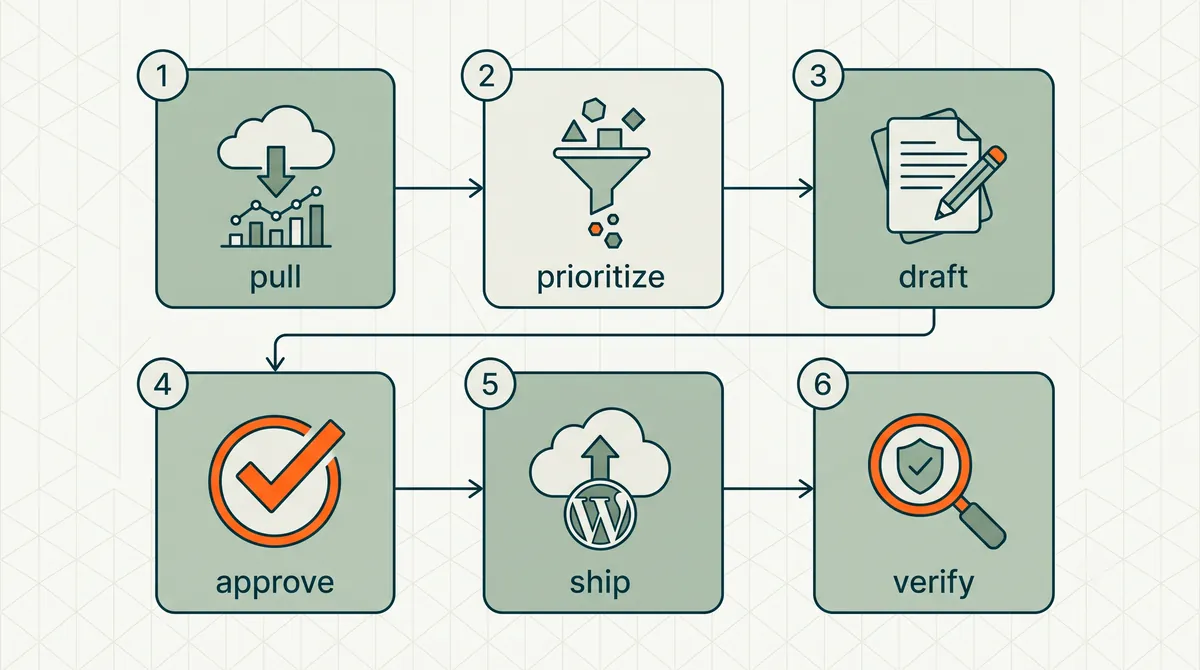
This guide walks through the full workflow: what data to pull, how to prioritize, how to draft, how to approve, how to ship, and how to verify. For the software landscape, see SEO Automation Software: 2026 Comparison. For the WordPress execution layer, see WordPress SEO automation.
Last updated: October 13, 2026. FAQ markup no longer earns a Google rich result; the FAQ advice below reflects that.
TL;DR
- The GSC-to-shipped-fix workflow has six steps: pull → prioritize → draft → approve → ship → verify.
- Most SEO teams break down between prioritize and draft — they know what to fix but never write the actual change.
- Striking-distance pages (positions 5–15) and high-impression/low-CTR pages are the highest-ROI starting points.
- Manual workflow works for 5 fixes/week. Agentic workflow scales to 30+ without adding headcount.
- Every shipped fix needs a change log entry and a +30 day verification check or you are flying blind.
The six-step workflow
Step 1: Pull
Connect Google Search Console to your analysis layer. Minimum data points per page:
- Queries (top 10–20 per page)
- Impressions (28-day window)
- Clicks
- CTR
- Average position
Optional but valuable:
- Page-level trends. Is this page gaining or losing impressions week over week?
- Query-level trends. Is a specific keyword moving up or down?
- Device split. Mobile vs. desktop performance differences.
- Country split. For sites with geographic targeting.
The pull should happen on a fixed cadence — weekly is the sweet spot. Daily is noisy. Monthly is too slow for striking-distance work.
If you are doing this manually, export the Search Console "Pages" and "Queries" reports into a spreadsheet. If you are using an agent or automation platform, the pull happens automatically on schedule.
Common mistake: pulling data and stopping. A GSC export sitting in a Downloads folder is not a workflow. It is a souvenir.
Step 2: Prioritize
Raw GSC data for a site with 500+ pages produces hundreds of potential actions. You cannot do all of them. Prioritization is the skill that separates effective SEO from busy SEO.
Priority framework for WordPress sites:
| Signal | What it means | Action type | Priority weight |
|---|---|---|---|
| High impressions, low CTR, position 1–10 | Title/meta is not compelling | Title + meta rewrite | High |
| Position 5–15, decent impressions | Striking distance — small push could hit page 1 | Title, meta, content, internal links | High |
| Position 15–30, high-volume query | Needs content depth or new section | Content expansion | Medium |
| Impressions growing, position stable | Google is testing you — reinforce | Content refresh, schema | Medium |
| Impressions declining, position dropping | Content decay or new competition | Content refresh, competitive analysis | Medium |
| Zero impressions, published 90+ days | Indexation or relevance problem | Technical check, content rewrite | Low (unless strategic page) |
Score each opportunity: priority = search volume estimate × commercial intent × (1 / effort to fix). Work the top of the list. Ignore the bottom until next week.
A site with 2,000 pages might surface 40–60 actionable opportunities per weekly pull. You will ship 10–20. That is correct. Not everything needs fixing this week. The loop repeats.
Step 3: Draft
This is where 80% of SEO workflows die.
Prioritization tells you what to fix. Drafting produces the actual fix — the new title tag, the rewritten meta description, the FAQ schema block, the internal link insertion, the content paragraph that closes the gap with the SERP leader.
Manual drafting (you or your SEO):
For each prioritized opportunity, produce a ready-to-ship artifact:
- Title rewrite: new title tag text, with primary keyword repositioned and a CTR modifier (number, year, outcome, or specificity).
- Meta rewrite: 150–160 character description with keyword, outcome, and call to action.
- Schema addition: valid JSON-LD for the appropriate type (FAQ, Article, Product, HowTo).
- Internal link: source page, target page, anchor text, insertion context.
- Content addition: specific section to add, with draft copy, placed after which existing heading.
Agent drafting (automation platform):
The agent produces the same artifacts automatically, using the GSC signal as context. "This page gets 14,000 impressions at 0.8% CTR for 'custom web design agency' at position 6.3. Current title: 'Web Design Services | Our Company.' Draft: 'Custom Web Design Agency — Portfolio, Process, and Pricing (2026)'."
The quality difference between manual and agent drafting has narrowed dramatically in 2026. A frontier model with good context produces drafts that take 30 seconds to review, not 30 minutes to write. The human role shifts from composer to editor.
Step 4: Approve
Every draft gets human review before it ships. No exceptions.
The approval step is not bureaucracy. It is the quality gate that makes agentic SEO safe and agency SEO client-ready.
What to check in approval:
- Keyword placement. Is the primary query naturally included without stuffing?
- Brand voice. Does the draft sound like the site, not like a robot?
- Accuracy. Does the meta description promise something the page actually delivers?
- Cannibalization. Does this title change conflict with another page targeting the same query?
- Compliance. For regulated industries, does the copy meet legal requirements?
Approval options:
- Approve as-is. Ship it.
- Edit and approve. Modify the draft, then ship.
- Reject. Log the rejection so you can spot repeats. (RankHive does not remember discards, so a later audit may suggest a similar fix again.)
Target approval time: 2–5 minutes per item. If approval takes longer, the drafts need better context or your prioritization is surfacing low-confidence opportunities.
Step 5: Ship
Approved changes go live on WordPress. This is the step that separates SEO automation from SEO reporting.
Manual shipping:
- Log into WordPress admin.
- Navigate to the page.
- Update the title, meta, schema, or content.
- Save/publish.
- Log the change (spreadsheet, project tool, or change log).
Time per manual ship: 3–8 minutes depending on where the fields live (block editor, SEO plugin sidebar, custom fields).
Automated shipping:
- Agent receives approval signal.
- Agent calls WordPress REST API with the change payload.
- WordPress updates the page.
- Change log records automatically: URL, field, before, after, timestamp.
Time per automated ship: seconds. Your time was spent in approval, not in CMS navigation.
WordPress SEO automation handles steps 1–5 in a single loop. GSC data in, approved changes out.
Step 6: Verify
The workflow is not complete when the change ships. It is complete when you know whether the change worked.
Verification cadence:
- +7 days. Early signal. Did CTR move? Did position shift?
- +14 days. Primary check. Compare impressions, clicks, CTR, and position against pre-change baseline.
- +30 days. Confirmation. Is the improvement sustained or was it noise?
Log results next to the change log entry. Over 90 days you build a dataset of what works on your site — which types of title rewrites move CTR, which content additions push striking-distance pages to page 1, which schema types earn rich results.
This feedback loop is what makes the next prioritization cycle smarter. Without verification, you are repeating the same guesses every week.
Manual vs. agentic: when to use which
| Factor | Manual workflow | Agentic workflow |
|---|---|---|
| Site size | Under 50 pages | 50+ pages |
| Weekly fix volume | 5 or fewer | 10+ |
| Team size | Dedicated SEO with time | Solo owner or small team |
| GSC data volume | Under 1,000 monthly clicks | 1,000+ monthly clicks |
| Approval capacity | You enjoy the drafting | You prefer reviewing over writing |
| Cost tolerance | Free (your time) | Platform subscription |
The manual workflow is legitimate for small sites. If you have 30 pages and 500 monthly clicks, you can run this loop in a spreadsheet and a WordPress admin tab in two hours per week. It works.
The agentic workflow pays off when the math breaks: too many pages, too many opportunities, not enough hours. That is most WordPress sites past the first year.
The weekly cadence (concrete example)
Here is what one week could look like for an illustrative WordPress services site with 200 pages and 8,000 monthly GSC clicks, running an agentic workflow:
Monday morning. Agent pulls fresh GSC data. Surfaces 22 opportunities: 8 title/meta rewrites, 5 internal link additions, 4 schema additions, 3 content expansions, 2 redirect fixes.
Monday afternoon. You open the approval queue. Review all 22 items. Approve 16. Edit and approve 3. Reject 3 (one cannibalization risk, two off-brand voice).
Right after approval. 19 changes ship to WordPress. Change log updates.
Following Monday. Agent pulls new data and surfaces a fresh set of opportunities; anything you left unreviewed is replaced. You also check the +7 day metrics on last week's shipped changes in Search Console — early, so treat them as a signal, not a verdict.
Week 4. You run the +30 day verification on week 1 changes: which rewritten titles moved CTR, which striking-distance pages moved position, and which did nothing.
That is how compounding is supposed to work. No single change needs to be dramatic. The aggregate is what you measure.
Where workflows break (and how to fix them)
Break 1: Data pull with no prioritization. You exported GSC. Now what? Fix: use the priority framework above. Score opportunities. Work the top 20%.
Break 2: Prioritization with no drafting. You know what to fix. You never wrote the fix. Fix: draft immediately during prioritization, or use an agent that drafts as part of the loop.
Break 3: Drafting with no shipping. You have a doc full of recommendations. Nothing is live. Fix: automate shipping via WordPress REST API, or block 30 minutes after drafting to ship manually.
Break 4: Shipping with no verification. You shipped 50 changes and have no idea which ones worked. Fix: tag every change. Check +14 and +30 day metrics. Build the feedback dataset.
Break 5: No cadence. You run the workflow once, feel productive, and do not repeat for six weeks. Fix: calendar block every Monday. The loop only compounds if it loops.
The spreadsheet trap (and why agents exist)
Before agents, the GSC-to-fix workflow looked like this for most WordPress owners:
- Export Search Console data to CSV.
- Paste into Google Sheets.
- Add columns: URL, query, impressions, CTR, position, recommended action, new title, new meta, status.
- Stare at 200 rows.
- Fix the top 3 because fixing 200 feels impossible.
- Close the spreadsheet.
- Repeat in 8 weeks when guilt resurfaces.
The spreadsheet is not a workflow. It is a graveyard for good intentions. It captures the awareness step perfectly and the drafting, shipping, and verification steps not at all.
Agents exist because the bottleneck was never data access. Google already gives you the data for free. The bottleneck was the labor between "I see the opportunity" and "the fix is live." That labor is pattern-matching work — exactly what LLMs are good at, bounded by human approval.
If you are still running the spreadsheet workflow, you do not need better spreadsheets. You need a system that drafts row 4 through row 200 while you review the top 20. That system is what SEO autopilot should mean: the drafting runs every week, and nothing ships until you approve it.
WordPress admin workflow: where each fix type lives
Once you have a draft, shipping means knowing which WordPress surface holds each field. Teams lose hours navigating wp-admin because nobody documented this map.
| Fix type | Where it lives in WordPress | SEO plugin field | Ship time (manual) |
|---|---|---|---|
| Title tag | Post/Page editor → SEO plugin sidebar | SEO Title | 2–3 min |
| Meta description | Same sidebar | Meta Description | 2–3 min |
| FAQ block + schema | Block editor → FAQ block or Rank Math FAQ | Schema tab → FAQ | 8–12 min |
| Internal link | Block editor → paragraph block | In-body content | 5–8 min |
| Content addition | Block editor → new Heading + Paragraph blocks | Post content | 10–15 min |
| Redirect | SEO plugin redirect manager or Redirection plugin | Redirect rules | 3–5 min |
Title and meta. Open the page in wp-admin. Scroll to the Rank Math or Yoast panel below the editor. Paste the approved draft. Preview the SERP snippet if your plugin offers it. Update.
FAQ schema. Prefer native FAQ blocks in Gutenberg (Yoast and Rank Math both have one): they put the questions and answers in the visible HTML, which is what readers and AI answer engines read. The block adds FAQPage markup for you. That markup is still valid, but Google stopped showing FAQ rich results for every site on May 7, 2026, so do not expect it to change how the result looks. Do not rely on invisible schema-only containers.
Internal links. Edit the source post (not the target). Find the paragraph where the link fits naturally. Highlight anchor text → link to target URL. Save. Purge cache if you use a caching plugin.
Content additions. Insert a new H2 block after the section the draft specifies. Paste the approved copy. Check heading hierarchy (no skipped levels). Publish or schedule.
Agentic WordPress SEO automation writes to these same fields via REST API after approval — no wp-admin navigation. For the software landscape behind the loop, see SEO Automation Software. For striking-distance prioritization inside step 2, see the striking distance keywords guide.
Worked example: SaaS marketing site moves from manual to agentic
This is an illustrative scenario, not a customer result. Picture a B2B SaaS company with 180 WordPress pages that has run the six-step workflow manually for two months: four to six fixes per week, always deprioritized when product launches land.
Baseline. 6,200 monthly GSC clicks. Twenty-three pages in striking distance (positions 5–15) with a combined 89,000 monthly impressions. The /features/analytics-dashboard/ page alone has 11,400 impressions at 0.9% CTR and position 6.1 for "marketing analytics dashboard."
Week 1 (agent connected). The first automated pull lists those striking-distance pages with drafted fixes: title rewrites, metas, internal links, schema. The team approves the ones that fit and discards the rest. Each fix ships as soon as it is approved.
Weeks 2–4. Each weekly audit replaces the last. Proposals on homepage-adjacent pages that clash with brand voice get discarded whenever they come up — RankHive has no exclusion list, so the team keeps a short written list of pages it never changes.
Day 30 check. The change log holds the before and after for every shipped item. The team compares CTR and position at +14 and +30 days against the baseline above, then decides whether the agent is earning its place.
What to watch for. The bottleneck was never GSC access. It was drafting and CMS navigation. Steps 3 and 5 are the ones an agent takes over; prioritization judgment and approval stay with the team.
That is the workflow working as designed: data in, approved fixes out, verification closing the loop. See Agentic SEO for WordPress for how the agent layer maps to this six-step model.
What to do this week
- Export your top 20 pages by impressions from Search Console (last 28 days).
- Score each page using the priority framework. Pick the top 5.
- Draft the actual fix for each — not a recommendation, the literal new title or meta text.
- Ship all 5 to WordPress today. Log before/after states.
- Set a +14 day calendar reminder to check results.
- If the manual loop felt valuable but slow, connect WordPress SEO automation and let the agent pull, prioritize, draft and ship while you keep the approval step. Onboarding shows what it found in your Search Console data before the payment step, so you can judge the first fixes on your own site.
FAQ
How often should I pull GSC data?
Weekly. Daily is too noisy for on-page optimization decisions. Monthly misses striking-distance windows.
What is a "striking-distance" keyword?
A query where your page ranks between positions 5 and 15 with meaningful impression volume. Small on-page improvements can push these to page 1.
Do I need an agent to run this workflow?
No. The manual version works for small sites. The agent version scales the drafting and shipping steps so you only handle prioritization judgment and approval.
What if GSC and WordPress URLs do not match?
Normalize URLs before correlating. Strip trailing slashes, resolve www vs. non-www, and map query parameters. Most automation platforms handle this. Manual workflows need a lookup table.
How many changes should I ship per week?
Start with 5. Scale to 15–30 as your approval speed improves. There is no universal optimum — it depends on opportunity volume and your review capacity.
Does shipping too many changes at once hurt SEO?
No. Google processes page-level changes independently. Shipping 20 title rewrites in one day is fine. What hurts is shipping bad changes without review.
How does this relate to technical SEO?
Technical SEO (crawl errors, indexation, site speed) is a parallel workflow. This guide covers on-page optimization driven by performance data. Both matter. They feed different fix types.
What is the minimum GSC history before this workflow pays off?
Six months of impression data is the practical floor. New sites with under 500 monthly impressions should fix technical foundations first — sitemap, indexation, core pages — then add the GSC-to-ship loop when signal density justifies weekly prioritization.
Related reading
- SEO Automation Software: 2026 Comparison
- WordPress SEO Automation
- Striking Distance Keywords: WordPress Quick Wins
- Agentic SEO for WordPress
- Automate SEO Reporting (Without Automating the Work)
Your job is to get this week's top five fixes live, then do it again next week. Run the six steps by hand, or let RankHive pull, prioritize and draft them from your Search Console data and ship each one to WordPress after you approve it.