

The most expensive mistake in WordPress SEO is arguing about which plugin to install while your pages sit unoptimized.
I have watched this play out a hundred times. A site owner spends three weeks comparing Yoast vs. Rank Math vs. SEOPress. They read comparison posts. They watch YouTube reviews. They install one, configure the basics, and feel productive. Six months later they check Search Console and realize nothing has changed. The plugin is running. The titles are still weak. The schema is still missing on half the pages. The category descriptions are still empty.
The plugin was never the bottleneck. The bottleneck was that nobody — human or machine — was doing the work the plugin exposes settings for.
This essay is about the layer above the plugin: the SEO agent. What a WordPress SEO plugin actually does (and does not do). What an SEO agent adds. Why they are not competitors. Why installing an agent does not mean uninstalling your plugin. And why the sites that rank are the ones that figured out the stack — not the ones that won the plugin debate.
For the plugin comparison, see Best WordPress SEO Plugin in 2026. For the agent layer, see WordPress SEO automation.
Last updated: July 9, 2026.
TL;DR
- A WordPress SEO plugin (Yoast, Rank Math, SEOPress) manages infrastructure: sitemaps, canonicals, schema templates, redirect tables, and meta field UI.
- An SEO agent manages decisions: which titles to rewrite, what schema to add, which pages to optimize, and ships the changes after approval.
- Plugins do not move rankings. They expose the controls. Agents do the work.
- The correct 2026 stack: plugin for infrastructure + agent for execution. Not one or the other.
- If you have a plugin installed but no optimization loop running, the plugin is not your problem. The missing agent (or human SEO) is.
What a WordPress SEO plugin actually does
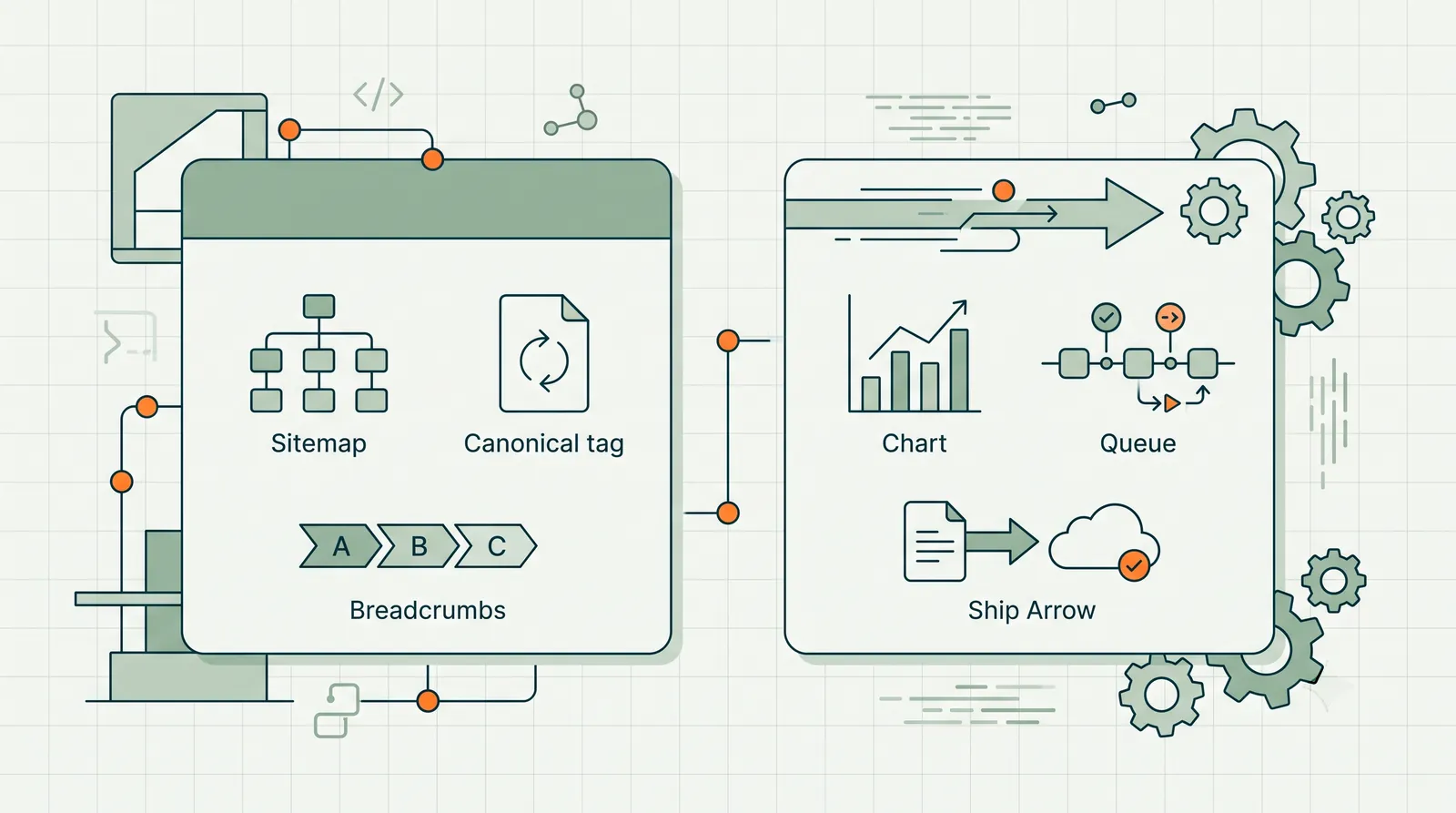
Strip away the marketing and a WordPress SEO plugin is an infrastructure layer. It does six things:
1. Meta field management. Adds title and description fields to posts, pages, and custom post types. Stores values in post meta. Outputs them in <head>.
2. XML sitemap generation. Creates and maintains sitemaps. Submits to search engines. Updates when content changes.
3. Schema markup templates. Provides JSON-LD templates for Article, Product, FAQ, Organization, BreadcrumbList, and other types. Outputs structured data on appropriate pages.
4. Canonical and indexation controls. Per-page noindex, nofollow, and canonical tag management. Site-wide defaults for archives, pagination, and taxonomies.
5. Redirect management. 301/302 redirect tables for changed URLs. 404 monitoring in premium tiers.
6. Admin UI and content analysis. Readability scores, keyword density checks, internal link suggestions, and social preview cards in the editor.
Every one of these is valuable. Every one of these is infrastructure. The plugin builds the road. It does not drive the car.
A plugin cannot tell you that /services/web-design/ has 14,000 impressions and a 0.8% CTR and needs a new title. It cannot draft that title. It cannot ship it. It provides the field where the title goes. That is it.
What an SEO agent actually does
An SEO agent operates at the decision and execution layer:
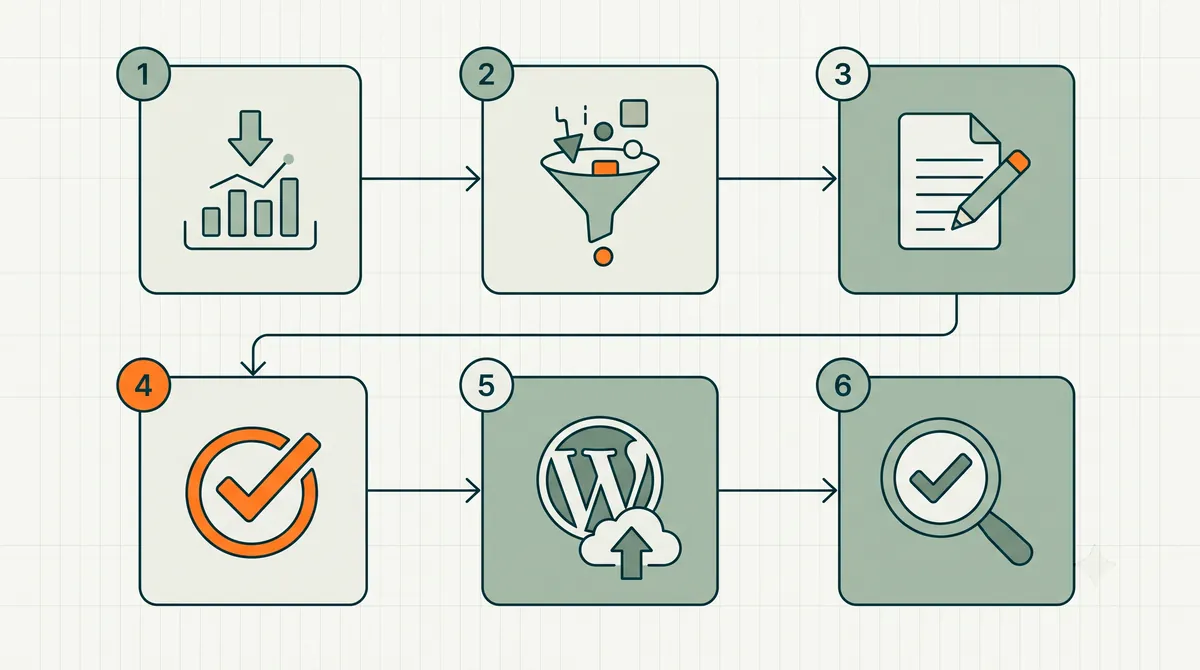
1. Data observation. Connects to Google Search Console, Analytics, and your WordPress site. Continuously monitors performance signals and site state.
2. Opportunity identification. Finds pages with high impressions and low CTR, striking-distance keywords, missing schema, thin content, and broken internal links.
3. Prioritization. Ranks opportunities by estimated impact. Works the highest-value items first.
4. Draft generation. Writes the actual title rewrite, meta description, schema block, content addition, or internal link — not a recommendation, the artifact itself.
5. Approval queue. Presents drafts for human review with evidence (the GSC query, the impression count, the current vs. proposed state).
6. Shipping. Pushes approved changes to WordPress via the REST API. Logs before/after states.
7. Outcome tracking. Monitors shipped changes for position and CTR movement over +14 and +30 days.
The agent drives the car. It still needs the road the plugin built.
Side by side: plugin vs. agent
| Capability | SEO Plugin | SEO Agent |
|---|---|---|
| Sitemap generation | Yes | No (uses plugin's sitemap) |
| Schema templates | Yes | No (writes to plugin's schema fields) |
| Meta field UI | Yes | No (writes to plugin's meta fields) |
| Redirect management | Yes | Can propose redirects; plugin stores them |
| Canonical/noindex controls | Yes | Can propose changes; plugin enforces them |
| Pulls Search Console data | No | Yes |
| Identifies optimization opportunities | No | Yes |
| Drafts title/meta rewrites | No | Yes |
| Drafts schema for specific pages | No | Yes |
| Drafts content additions | No | Yes |
| Ships changes to WordPress | No | Yes |
| Requires human approval | N/A | Yes |
| Tracks outcome of changes | No | Yes |
| Runs continuously without prompting | No | Yes |
The table makes the relationship clear. The plugin is the storage and output layer. The agent is the intelligence and execution layer. They do different jobs.
Why "which one should I use?" is the wrong question
The WordPress SEO community has been stuck on plugin comparison for a decade because plugins were the only layer available. You picked Yoast or Rank Math, configured it, and then... you were the agent. You pulled GSC data. You decided what to fix. You typed the new title into the plugin's field. You clicked save.
That model worked when sites had 30 pages and SEO was a side project. It breaks at 300 pages. It breaks when nobody on the team has "SEO" in their job title. It breaks when you are an agency managing twelve client sites.
The right question in 2026 is not "Yoast or Rank Math?" It is: "Who or what is doing the optimization work?"
If the answer is "nobody" or "me when I remember," you do not have a plugin problem. You have an execution problem. And an agent solves execution in a way no plugin can.
The three WordPress SEO stacks in 2026
Stack 1: Plugin only (infrastructure, no execution)
Components: Rank Math or Yoast. Maybe Screaming Frog once a quarter.
Who does the work: You, manually, when you remember.
Best for: Sites under 30 pages where the owner enjoys SEO and has time for it.
Failure mode: Plugin is configured. Nothing changes for months. Owner thinks SEO is "handled" because the plugin is active.
Stack 2: Plugin + human SEO (infrastructure + manual execution)
Components: Rank Math or Yoast + a freelancer or agency doing monthly optimization.
Who does the work: A human SEO pulling data, making recommendations, and typing changes into the plugin's fields.
Best for: Sites with budget for a monthly SEO retainer and a human who knows the brand.
Failure mode: Execution scales linearly with cost. Agency recommends 15 changes/month. Five get implemented. The rest sit in a report.
Stack 3: Plugin + agent (infrastructure + automated execution)
Components: Rank Math or Yoast + WordPress SEO automation (RankHive or equivalent).
Who does the work: The agent drafts and ships after your approval. You review a weekly queue.
Best for: Sites with 50+ pages, meaningful GSC data, and no full-time SEO.
Failure mode: Approval queue grows because nobody reviews it. Fix: calendar block 30 minutes per week.
Stack 3 is the 2026 default for any WordPress site serious about organic search. Stack 1 is fine for hobby sites. Stack 2 is fine if you have a great agency relationship. Stack 3 is what replaces Stack 2's execution bottleneck without replacing the strategy layer.
The WordPress workflow: how plugin and agent divide labor
Understanding where each layer stops is the fastest way to stop bikeshedding and start shipping. Here is the weekly loop on a real WordPress site running Rank Math plus WordPress SEO automation.
Monday. The agent pulls Search Console data and reads current post state via REST API. Rank Math does nothing during this step — it is passive infrastructure. The agent finds /blog/email-marketing-guide/ at position 9 with 3,200 impressions and 0.4% CTR.
Tuesday. The agent drafts a new SEO title and meta description, writing to Rank Math's meta fields (not guessing — targeting the exact field keys the plugin expects). You open the approval queue. The plugin still does nothing. This is the decision layer.
Wednesday. You approve three title rewrites and one FAQ schema block. The agent ships via API. Rank Math validates schema, updates sitemap lastmod, and outputs the new <title> on next page render. The plugin activates here — output and infrastructure.
Thursday–Sunday. Google recrawls. Rank Math serves consistent canonicals and structured data. The agent monitors +7 day CTR on shipped URLs.
Next Monday. New opportunities surface. The plugin never "decided" anything. It held the road open while the agent drove.
That division — plugin as storage/output, agent as intelligence/execution — is the entire argument of this essay in one workflow. If your plugin is configured but this loop never runs, rankings will not move. The plugin was never going to move them.
For the data-to-ship mechanics, see From GSC Data to Shipped WordPress Fixes. For the category definition, see What Is Agentic SEO?.
Mini case study: 180-page B2B services site
A WordPress agency client — commercial cleaning services, 180 pages across 12 city landing pages, 40 service posts, and a blog — had Rank Math Pro installed for fourteen months. Sitemaps worked. Schema templates fired. Organic traffic was flat at 2,100 monthly clicks.
The owner spent three weeks in 2025 comparing Yoast vs. Rank Math vs. SEOPress. She switched nothing. She did install WordPress SEO automation in March 2026.
Week 1. The agent surfaced 31 opportunities. Nineteen were title/meta rewrites on city pages ranking positions 8–13. Eight were missing LocalBusiness schema on service pages. Four were internal link gaps from high-traffic blog posts to money pages.
Week 4. Forty-two changes shipped after approval. Rank Math's dashboard still showed green lights — the difference was that somebody was finally filling its fields with GSC-informed values.
Day 90. City landing page impressions up 28%. Average position on top 15 commercial queries improved from 10.4 to 7.8. CTR on rewritten titles up 1.6 percentage points on average. The plugin did not change. The execution layer did.
The lesson is not "Rank Math won." The lesson is that fourteen months of correct infrastructure plus zero execution equals flat traffic. One agent loop on top of the existing plugin produced more movement in ninety days than three weeks of plugin comparison ever could.
"Should I uninstall my SEO plugin if I get an agent?"
No. Keep the plugin. The agent writes to the plugin's fields.
When an agent ships a title rewrite to WordPress, it updates the post title and the SEO plugin's meta title field. When it adds schema, it writes to the plugin's schema output. When it creates a redirect, it adds to the plugin's redirect table.
Uninstalling the plugin would remove the infrastructure the agent depends on. Sitemaps would break. Schema templates would disappear. Canonical controls would vanish.
The agent does not replace the plugin. It replaces the human who was supposed to be typing into the plugin's fields.
The bikeshedding trap (and how to escape it)
Paul Graham wrote about bikeshedding — the tendency to argue about the color of the bikeshed while the nuclear reactor goes unmaintained. WordPress SEO has the most expensive bikeshed in marketing technology: the plugin debate.
Here is what bikeshedding costs you. Three weeks comparing plugins at 5 hours per week is 15 hours. At a loaded labor cost of $50/hour, that is $750 in opportunity cost. In those same 15 hours, an agent could have surfaced and drafted 40–60 on-page optimizations for your site. You would have shipped 20 of them. Some would already be showing CTR movement in Search Console.
The escape route is simple:
- Pick a plugin in 60 minutes. Rank Math free tier. Done.
- Configure sitemaps and schema defaults in 30 minutes. Done.
- Connect an agent or block weekly time for manual execution. This is where the other 14 hours should have gone.
- Never revisit the plugin decision unless the plugin breaks or you need a specific feature it lacks.
The sites ranking in your niche are not ranking because they picked the right plugin. They are ranking because someone — human or agent — consistently ships on-page improvements week after week. The plugin is table stakes. The loop is the game.
When you need neither
Two scenarios where the plugin-vs-agent debate is irrelevant:
Your site is brand new. Under 20 pages, under 200 monthly clicks. Install a plugin (Rank Math, free tier is fine). Write your first content. Build initial site structure. Add an agent when you have Search Console data worth acting on.
You have a dedicated SEO who produces strong weekly output. Your SEO uses the plugin's fields, pulls GSC data, and ships changes consistently. An agent might speed them up but is not essential. Give them AI drafting tools and skip the autonomous loop.
Everyone else — the 95% of WordPress sites where SEO is "something we should do" but nobody owns it — needs Stack 3.
The plugin comparison still matters (but for the right reasons)
I am not dismissing the plugin decision. It still matters — for infrastructure quality, not for rankings.
Pick Rank Math if you want the deepest free tier, modern UI, and schema-first design. This is the default recommendation for most sites in 2026. See the full comparison in Best WordPress SEO Plugin.
Pick Yoast if you want the safest, most familiar option and do not want to think about it.
Pick The SEO Framework if performance footprint is your top priority.
Pick SEOPress if you want one-time licensing with no subscription.
But spend no more than one hour on this decision. Install it. Configure sitemaps, schema defaults, and canonical rules. Then move on to the execution question — because that is where rankings actually come from.
What to do this week
- Check which plugin you have installed. Is it configured? Are sitemaps generating? Is schema outputting? If not, spend 30 minutes on setup.
- Export your top 10 pages by GSC impressions. Are the titles and metas optimized? If not, your plugin is not the problem — execution is.
- Pick your stack. Plugin-only if you have time and enjoy SEO. Plugin + agent if you have data and no execution bandwidth.
- If you chose Stack 3, connect WordPress SEO automation on top of your existing plugin. Review the first proposal queue.
- Read the plugin comparison — Best WordPress SEO Plugin in 2026 — if you have not picked a plugin yet. One hour max.
FAQ
Can an SEO agent work without an SEO plugin?
Technically yes — the agent can write directly to post meta and output schema via the REST API. But you lose sitemap management, canonical controls, and the redirect table. Keep the plugin.
Does RankHive replace Yoast or Rank Math?
No. RankHive runs alongside your existing SEO plugin. The plugin handles infrastructure. RankHive handles optimization decisions and execution.
Which plugin works best with an SEO agent?
Any major plugin (Yoast, Rank Math, SEOPress, The SEO Framework) works. Rank Math is the most common pairing because of its schema depth and REST API field compatibility.
Is a plugin enough for good SEO?
A plugin is necessary but not sufficient. It provides the infrastructure. Somebody or something still needs to decide what to optimize and ship the changes. Without that execution layer, the plugin is an idle control panel.
Should agencies use plugins or agents for client sites?
Both. The plugin on each client site. The agent across the portfolio. The agency's strategist reviews approval queues. See WordPress SEO Automation for Agencies.
What about SEO plugins that claim AI features?
Some plugins now offer AI title suggestions inside the editor. That is a drafting aid for one page at a time, triggered manually. An agent runs the full loop across your entire site on a schedule. Different category.
I already pay for Semrush/Ahrefs. Do I still need an agent?
Semrush and Ahrefs are discovery tools. They tell you what to fix. An agent drafts and ships the fix. Discovery without execution is the most common waste in SEO tooling.
What if my SEO plugin and agent disagree on a title?
The agent writes to the plugin's SEO title field. On render, the plugin wins — it outputs what is stored. If you edit a title manually in Rank Math after the agent ships, that manual version persists until the next agent proposal you approve. There is no conflict; the plugin is the source of truth for output. The agent is the source of proposals.
Related reading
- Best WordPress SEO Plugin in 2026
- WordPress SEO Automation
- AI SEO Service vs. AI SEO Agent
- Agentic SEO for WordPress
- When an SEO Agent Should Never Auto-Publish
Your plugin built the road. Now something needs to drive the car. Try RankHive's WordPress SEO automation — works alongside Yoast, Rank Math, or SEOPress, and ships the changes your plugin has been waiting for.