
Every WordPress owner has seen the green light.
You write a post. Yoast SEO smiles at you. Focus keyphrase: green. SEO title width: green. Meta description: green. Readability: green. You hit publish with the quiet satisfaction of someone who did the SEO thing.
Six months later you open Google Search Console. That post has 14,000 impressions, position 9.3, CTR 0.9%. Your green light did not lie. You satisfied the plugin's checklist. You did not satisfy the search result.
This is the gap nobody talks about at WordPress meetups. Yoast SEO alternative is one of the most searched phrases in the plugin market. People type it when they are frustrated. The frustration is almost never "Yoast's UI is ugly." It is "I did everything the plugin asked and my traffic is flat."
Here is the contrarian read: Yoast is not the problem. Treating a settings plugin as a worker is the problem. The best Yoast SEO alternative in 2026 is not Rank Math, or SEOPress, or AIOSEO — though any of those might be a fine plugin swap. The best alternative is admitting what plugins do and adding the layer that does what plugins cannot.
Plugins score. Agents ship.
Last updated: July 2, 2026.
TL;DR
- A Yoast SEO alternative that only swaps one plugin for another solves the wrong problem if your issue is "flat traffic despite green lights."
- Yoast, Rank Math, and every serious SEO plugin expose settings. They do not sustain the weekly optimization loop.
- The winning stack for most WordPress sites: keep your plugin + add execution automation that drafts and ships approved fixes.
- RankHive works alongside Yoast — it does not replace it. You review changes in RankHive; RankHive writes the fields Yoast manages.
- If you have not picked a plugin yet, read best WordPress SEO plugin first. If you already have Yoast configured, do not migrate for sport. Stack.
- WordPress SEO automation is the category name for the execution layer. Pricing is published if you want to compare cost to an agency hour.
The green light is a checklist, not a outcome
Yoast SEO is good at what it was built for. It gives non-technical authors a checklist at the edge of the editor. Put the keyphrase in the title. Write a meta description. Do not make paragraphs too long. Add internal links. Configure site-wide schema templates. Generate a sitemap. It is training wheels and guardrails, and for millions of sites that is genuinely valuable.
What Yoast was never built to do: watch your Search Console data every week, notice that your /pricing page lost 2 points of average position on a 6,000-impression query, draft a new title based on the actual SERP, propose a content block that answers the query directly, and queue the change for your approval.
That is not a plugin job. That is an operator job.
The confusion happens because Yoast's UI feels like doing SEO. You interact with it on every post. You get immediate feedback. The green light is dopamine. But on-page checklist compliance and search performance are correlated, not equivalent. You can pass every Yoast check and still lose to a competitor with worse plugin hygiene and better query targeting.
This is why the Yoast SEO alternative search intent splits into two completely different people.
Person A hates Yoast's upsells, or wants Rank Math's free schema, or needs a lighter footprint. That person should switch plugins. Our plugin comparison covers that decision honestly.
Person B has Yoast configured fine. Traffic is flat. They do not need a new plugin. They need the work Yoast cannot do. That person should stack.
Most searchers are Person B and buy Person A's solution.

What Yoast actually does (and where it stops)
Strip the marketing. Yoast SEO is a configuration and compliance layer for WordPress.
It controls:
- Title and meta description templates per post type.
- Canonical URLs and indexability flags.
- XML sitemaps.
- Schema graph assembly at the template level.
- Breadcrumbs.
- Redirects (paid tier).
- Readability and keyphrase scoring in the editor.
All of that matters. You want one plugin doing it. You want it configured once and left alone.
Yoast does not:
- Pull your Search Console data on a schedule.
- Prioritize which of your 200 pages deserves attention this week.
- Draft title rewrites grounded in real impression and CTR data.
- Propose content updates for striking-distance pages.
- Ship approved changes back to WordPress without you opening each post manually.
- Log what changed and why.
The last three items are where rankings actually move for established sites. They are also the three items every plugin vendor implies their product handles when you squint at the feature list. None of them do. Not Yoast. Not Rank Math. Not SEOPress.
That is not a criticism. It is a category boundary.
The migration trap
It is a common pattern. Traffic is flat. Owner searches "Yoast SEO alternative." Migrates to Rank Math. Spends a weekend on settings import, sitemap resubmission, schema audit. Feels productive. Traffic stays flat. Searches "Rank Math alternative." Migrates again.
The plugin was never the bottleneck. The bottleneck was that nobody was doing the weekly optimization loop on the pages that already existed.
Switching plugins to fix a performance problem is like switching notebooks to fix a writing habit. Sometimes the new notebook is nicer. The words still have to get written.
If your current plugin is misconfigured — duplicate canonicals, wrong sitemap, broken schema — fix that or switch. Run the eight-point audit in our plugin guide. But if the audit passes and traffic is still flat, stop shopping for plugins. Start shopping for execution.
Stack, don't replace
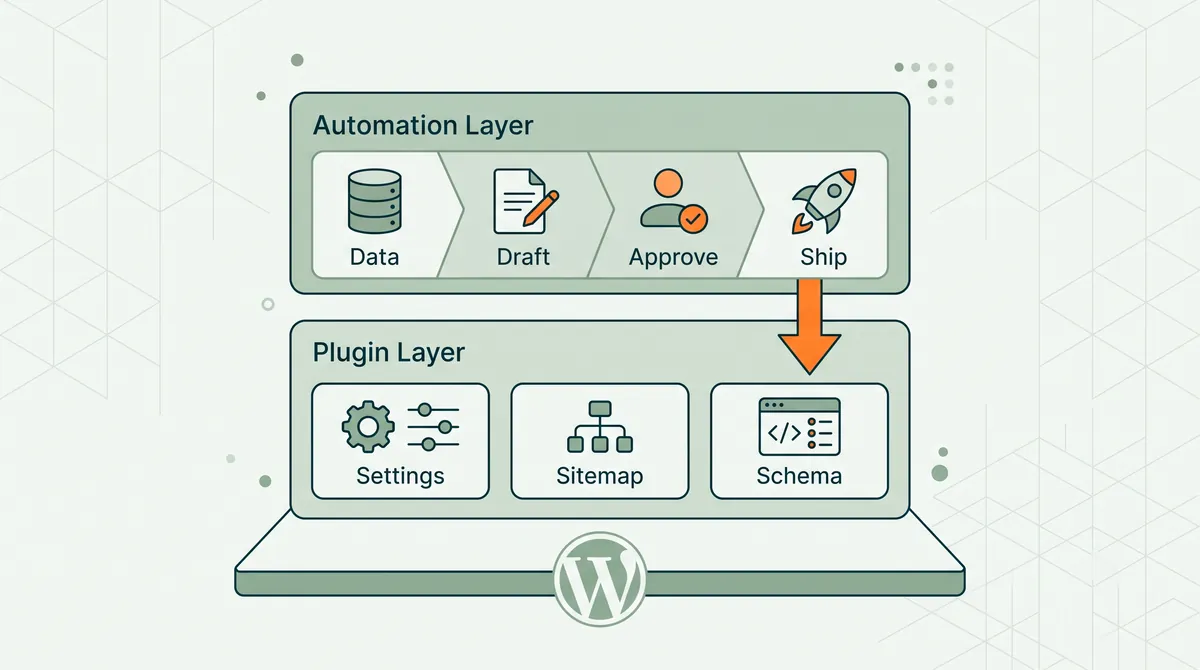
The model that works in 2026 is a two-layer stack.
Layer 1: SEO plugin (Yoast, Rank Math, whatever you picked). Owns WordPress SEO infrastructure. Site-wide settings. Editor sidebar. Sitemaps. Schema templates. Keep it. Configure it cleanly. Do not run two plugins.
Layer 2: WordPress SEO automation (RankHive or equivalent). Owns the weekly loop. Observe search data. Prioritize opportunities. Draft fixes. Queue for approval. Ship to WordPress. Log changes.
Layer 2 writes into Layer 1's world. When RankHive proposes a title change, it updates the post the way you would — through WordPress, respecting the SEO plugin's fields. Yoast stays installed. Yoast keeps generating your sitemap. RankHive does not rip out your meta templates.
This is the honest answer to "what is the best Yoast SEO alternative?" For Person B — the flat-traffic owner with a fine Yoast setup — the alternative is augmentation, not replacement.
WordPress SEO automation is what that second layer is called when you are evaluating vendors. The feature page walks through the integration model: connect site, sync data, review queue, approve, ship.
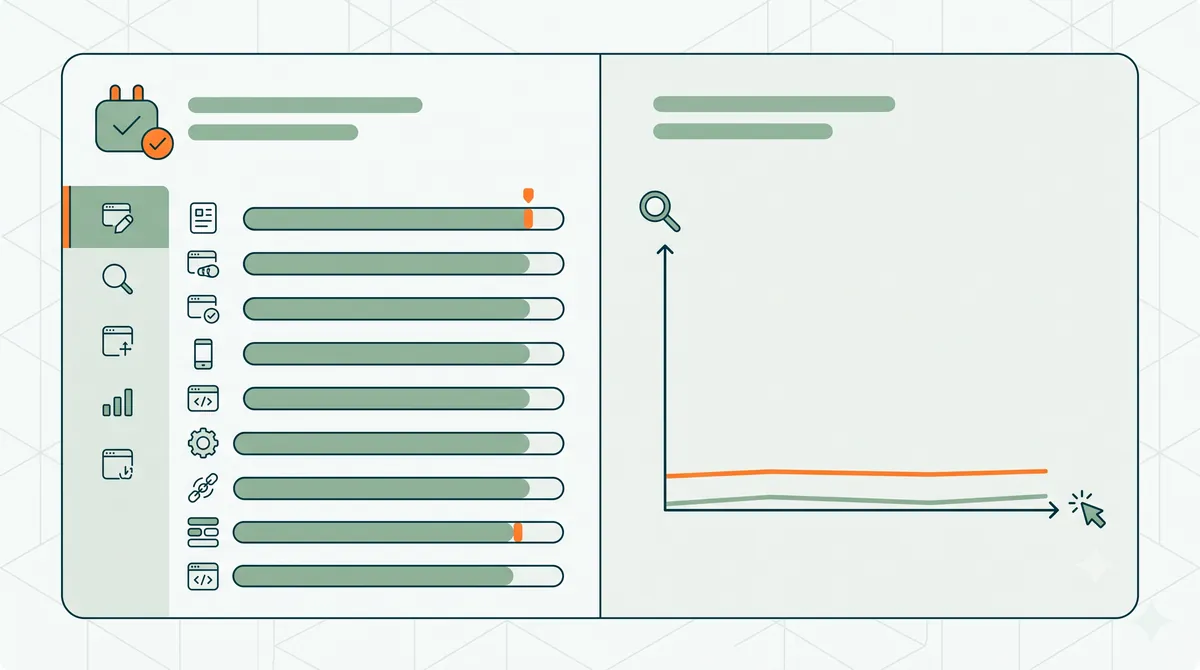
Yoast scores vs. RankHive ships
The title of this essay is not a dunk on Yoast. It is a division of labor.
| Job | Yoast (plugin layer) | RankHive (automation layer) |
|---|---|---|
| Site-wide SEO settings | Yes | No — uses your plugin's setup |
| Per-post checklist in editor | Yes | No — works from data, not checklist |
| Sitemaps and canonicals | Yes | No sitemaps; fixes canonicals you approve |
| Schema templates | Yes | Proposes page-level schema fixes |
| Weekly GSC analysis | No | Yes |
| Prioritize pages by opportunity | No | Yes |
| Draft title/meta from real query data | No | Yes |
| Draft content updates for existing posts | No | Yes |
| Queue changes for approval | No | Yes |
| Ship approved changes to WP | No | Yes |
| Change log | Limited | Yes |
Yoast scores your draft against a keyphrase you typed. RankHive scores your live site against search reality and brings you fixes.
Both can be true at once. That is the stack.
A concrete example
Your services page ranks for "emergency plumber austin" at position 10.4. 8,200 impressions last month. CTR 1.1%. The page title is "Emergency Plumbing Services | ABC Plumbing." Yoast gives it a green light. The keyphrase is in the title. The meta is present. Readability is fine.
An automation layer looks at the SERP and notices the top results use "24/7" and "same-day" in titles. It notices your page body never answers how fast you arrive. It drafts:
- New title: "24/7 Emergency Plumber in Austin — Same-Day Service | ABC Plumbing"
- Meta refresh: focused on response time and service area.
- Content block: 120 words with average response time, service area zip codes, and a direct answer to "how fast can you get here?"
- FAQ schema: two questions pulled from "People also ask."
You review in the queue. Edit the title slightly. Approve. The changes write to WordPress. Yoast picks them up. Sitemap unchanged. Schema validates.
Yoast did not stop being useful. Yoast just was never going to initiate that workflow.
Do the arithmetic for your own page: on 8,200 impressions, every extra percentage point of CTR is about 82 more clicks a month. No tool can promise the lift, but a title that was never written for the query leaves room for one. Multiply by every striking-distance page you were never going to open manually.
Worked example: keeping Yoast, adding the loop
This is an illustrative scenario, not a customer result. Here is what the stack looks like when nobody migrates anything.
Picture a dental clinic running Yoast Premium on 140 indexed pages, with eighteen months of GSC data and flat traffic. Every service page has green lights. The owner is one frustrated Saturday away from switching to Rank Math.
Instead they keep Yoast and add RankHive. No settings import. No sitemap panic.
First audit: RankHive reads the last 28 days of Search Console data and lists service pages in positions 5–20 with impressions, titles that miss the query people actually search, and pages with low click-through for their position. Each fix shows the query, impressions, clicks and position behind it.
Each week after: the owner opens the queue, hand-edits a title or two, approves the rest, and discards what does not fit. Approved titles and descriptions are written into Yoast's fields. The Change Log keeps the before and after, so any title can be reverted.
Yoast still shows green throughout. The plugin does not break. It also does not initiate a single one of those changes. That is the stack working as designed.
The scoring-vs-shipping split is not abstract. It is two different jobs pretending to be one:
| Dimension | Scoring (your SEO plugin) | Shipping (automation layer) |
|---|---|---|
| Input | Your draft + a focus keyphrase you typed | Live GSC queries + what the SERP actually shows |
| When it runs | While you write, once per post | Weekly, site-wide, including pages you forgot exist |
| Output | Red, green, or orange checklist | Drafted title, meta, content block, schema patch |
| Success metric | Did you satisfy the checklist? | Did CTR, position, or clicks move? |
| Who initiates | Author at publish time | Operator reviewing a prioritized queue |
| Effect on rankings | Almost nothing by itself | Approved changes on high-impression URLs |
Scoring tells you the post is eligible. Shipping makes the post competitive. Most WordPress owners stop at eligible and wonder why traffic is flat.
When you should switch plugins instead
Stacking is not always the answer. Switch Yoast (or your current plugin) if:
- You are on Yoast Free and need redirects without paying Premium — Rank Math Free includes a redirect manager.
- Yoast's admin footprint bothers you on a performance-sensitive site — The SEO Framework is lighter (though RankHive can't write titles and descriptions through it).
- You want one-time licensing — SEOPress Pro is a sane buy-once model.
- Your schema is wrong and Yoast's graph does not cover your content type — Rank Math or SEOPress may fit better.
- You are misconfigured — two SEO plugins active, theme SEO not disabled, duplicate sitemaps.
Those are plugin problems. Our comparison guide ranks the contenders with migration notes.
If none of those apply, you do not have a plugin problem. You have an execution problem. Stack.
RankHive honestly
RankHive is our product. We built it for WordPress owners with correctly configured Yoast installs and flat traffic graphs, where the plugin is fine and the Tuesday morning Search Console routine is not happening.
RankHive connects to WordPress and Google Search Console. It runs a weekly observe-decide-draft loop. It surfaces a small queue of reviewable changes — titles, metas, content updates, schema, internal links, technical fixes. You approve or discard each one in RankHive. Approved changes ship through the integration. Nothing auto-publishes.
What RankHive does not do:
- Replace your SEO plugin.
- Auto-publish net-new blog posts without review.
- Guarantee rankings. Nobody honest can.
- Replace strategic SEO thinking — site architecture, link building, brand positioning.
What RankHive does do:
- Turn the weekly Search Console grunt work into a review queue you approve, edit or discard.
- Ground every draft in your actual search data, not a generic keyphrase field.
- Keep a change log so you know what shipped and when.
- Work with Yoast, Rank Math or SEOPress — whichever you already run (All in One SEO isn't supported yet).
SEO Autopilot is the product name for the weekly loop. WordPress SEO automation is the category page if you are evaluating whether the integration model fits your stack. Pricing is site-based. No "contact sales" for a single install.
We would rather you keep Yoast and add RankHive than migrate plugins for no reason and still skip the weekly work.
How the stack fits your existing workflow
If you are a solo WordPress owner today, your workflow probably looks like:
- Write content in Gutenberg.
- Glance at Yoast sidebar. Fix reds. Publish.
- Intend to check Search Console monthly. Check quarterly.
- Notice traffic is flat. Google "Yoast SEO alternative."
The stacked workflow:
- Write content in Gutenberg. Yoast sidebar still there. Publish.
- RankHive audits new and existing pages against GSC data once a week.
- Once a week, open the approval queue. Review five proposed changes. Approve four.
- Changes ship. Yoast reflects updated fields. Sitemap includes updated URLs.
- Quarterly, run a deeper audit using our WordPress SEO audit guide for strategic issues automation does not cover.
Yoast remains the editor experience for authors. RankHive is the operator experience for the person who owns traffic. Different users, different layers, same site.
What about Rank Math as a Yoast alternative?
Rank Math is the most common literal Yoast replacement. The free tier is generous. Schema coverage is excellent. The UI is modern. If you are on Yoast Free and want redirects, local SEO features, or a less aggressive upsell path, Rank Math is a credible switch.
But switching Yoast → Rank Math without adding an execution layer still leaves you with a plugin that scores and configures. Rank Math's "Content AI" helps draft in the editor. It does not run a continuous site-wide loop from GSC data and ship a weekly queue. Different job.
The best sequence for most sites:
- Pick and configure one plugin. Yoast or Rank Math. Not both.
- Verify the foundation: sitemaps, canonicals, schema, indexability. Technical SEO guide if needed.
- Add automation for the weekly execution loop.
- Stop thinking about plugin migration unless something is actually broken.
The agency version of the same stack
Agencies search "Yoast SEO alternative" too. Often they mean "something we can deploy across 30 client sites without rebuilding each install."
The stack model works better for agencies than plugin migration. Client sites already have Yoast or Rank Math configured. Ripping it out is billable hours that do not move client traffic. Adding an automation layer that queues weekly fixes per site — that is billable hours that compound.
A RankHive approval queue per client site plus plugin stability on each one is a cleaner operations model than standardizing on a new plugin and still doing manual GSC reviews per client.
What to do this week
If you have Yoast and flat traffic:
- Do not migrate plugins yet.
- Open Search Console → Performance → Pages. Find your top 10 URLs by impressions with below-average CTR.
- Manually rewrite one title and meta. Ship it. Wait two weeks.
- If that felt valuable and you have nine more pages you will not get to — that is the gap the stack fills.
If you are misconfigured:
- Run the eight-point plugin audit from best WordPress SEO plugin.
- Fix or switch. Then stack.
If you are starting fresh:
- Pick a plugin from the comparison. Rank Math or Yoast are both fine defaults.
- Configure once.
- Add automation when you have 60+ days of GSC data.
Frequently asked questions
Is RankHive a Yoast SEO alternative?
Not in the plugin sense. RankHive does not replace Yoast's sitemaps, schema templates, or editor sidebar. It is an alternative to doing all SEO work manually while Yoast holds your settings. For most flat-traffic sites, that is the alternative you actually need.
Can I use RankHive with Yoast Premium?
Yes. RankHive writes post-level SEO fields through WordPress. Yoast Premium features (redirects, internal linking suggestions, etc.) keep working. RankHive's own redirects are a separate list, so keep one rule per URL. The full field list and the gotchas are on RankHive with Yoast SEO.
Should I switch from Yoast to Rank Math before adding RankHive?
Only if you have a specific plugin feature reason — redirects on free tier, schema gap, performance. If Yoast is configured and stable, switching is optional, not a prerequisite for RankHive.
Will RankHive mess up my Yoast settings?
No. RankHive proposes changes to individual posts and pages. It does not overwrite site-wide Yoast templates or sitemap configuration. You approve each change before it ships.
Is Yoast bad in 2026?
No. Yoast is a safe, mature default, especially for editorial teams who need author-facing checklists. It is not a complete SEO program by itself. No plugin is.
How is this different from Yoast AI features?
Yoast's AI features help you draft inside the editor while you are writing a post. RankHive runs site-wide analysis from Search Console data and brings you a prioritized queue of fixes on pages you may not have opened in months. Different trigger, different scope.
Does RankHive work with WooCommerce?
Only for the WordPress posts and pages on your store, such as the blog. RankHive has no WooCommerce-specific support: it does not optimize product or category pages or write product schema. See WooCommerce SEO for the manual playbook on those.
What does the stack cost?
Yoast Free or Rank Math Free covers the plugin layer for many sites. RankHive pricing is on the pricing page. Compare that to one hour of agency SEO time per week and the math is usually obvious.
Related reading
- Best WordPress SEO Plugin in 2026 (Beyond Yoast)
- What SEO Autopilot Actually Means for WordPress
- What Is Agentic SEO?
- How to Improve WordPress SEO in 2026
- WordPress SEO Audit: 10 Steps That Ship Fixes
- Best SEO Automation Software for WordPress
- WordPress SEO Automation
- SEO Autopilot for WordPress
Yoast scores. RankHive ships. Keep your plugin either way; the weekly work is the part to decide on. Do it by hand in Yoast's fields with the routine above, or let RankHive find the fixes in your Search Console data and ship them after you approve them.