The execution layer for your
client WordPress sites
RankHive does not replace your agency stack. It takes the routine on-page work your team never gets to (the audits, the title rewrites, the schema, the striking-distance fixes), drafts it per client site, and waits for someone to approve it.
The work that never gets billed and never gets done
Every agency has the same backlog. Twenty client sites, each with a list of on-page fixes someone identified months ago: thin title tags, missing schema, pages sitting at position 12 that need one more section, internal links that were never added.
None of it is hard. All of it is small, repetitive, and impossible to make profitable at an hourly rate a client will accept. So it waits behind the strategy work that justifies the retainer, and the audit deck from March is still an audit deck in September.
That gap is where clients quietly lose confidence. They paid for a report, they agreed with the report, and nothing on the site changed.
Who can do what in a client team
RankHive has two roles, owner and member. There is no read-only or approve-only role, so anyone you invite to a team can approve changes on that client’s site.
| Action | Owner | Member |
|---|---|---|
| Review, edit, approve or discard drafted changes | Yes | Yes |
| Approve a whole audit at once, up to 50 changes | Yes | Yes |
| Ask for a rewrite with an instruction | Yes | Yes |
| Review and schedule new articles | Yes | Yes |
| Revert a change from the Change Log | Yes | Yes |
| Invite people to the team | Yes | Yes |
| Remove members and change roles | Yes | No |
| Manage the subscription and billing | Yes | No |
| Approve the WordPress plugin connection | Yes | No |
| Add or delete the site, disconnect WordPress | Primary owner | No |
| Transfer ownership of the team | Primary owner | No |
The primary owner is the person who created the team, or whoever ownership was last transferred to.
How it works
Create a team for the client
From the team switcher, choose Create team and name it after the client. A team has its own members, Search Console connection, site, queue, Change Log and subscription, so one client’s data never mixes with another’s.
Connect the client’s Search Console
Ask the client to add the Google account you will use as a user on their Search Console property. Then sign in with Google in the new team. RankHive asks for read-only access and lists the properties that account can see. Pick the client’s.
Set the site context
RankHive writes a short summary of the site. Correct it, then add article instructions: the client’s voice, products, words to avoid and claims they can’t make. Drafted articles follow them.
Connect WordPress
Someone with admin access to the client’s WordPress installs the free RankHive AI SEO Agent plugin (WordPress 6.5 or later, PHP 8.1 or later) and clicks Connect. An owner of the client’s team approves; check the team name before you do.
Subscribe and review the first audit
Choose monthly or yearly billing in that team. The first analysis starts after payment, and its findings land in the client’s queue for your team to review.
One team per client site
RankHive organizes everything by team. A team holds its members, one Search Console connection, its site, a queue of drafted changes, a Change Log and a subscription. For an agency, the setup that fits is one team per client site: your staff are members of every client team, and a client you invite sees only their own.
You switch clients from the team switcher at the top of the app, which shows the team and site you are working in. Everything after the switch (the queue, the Keywords page, the Content Calendar, the Change Log) belongs to that client. There is no view across all clients at once.
The Search Console connection belongs to the team, not to your login. Each client team connects to Google separately, so you can use one agency Google account for every client or a different one per client, depending on how each client granted access.
Keep one person, usually an agency lead, as the owner of every client team. Owners handle billing, members and the WordPress connection; members do the weekly review. The table above shows the split. For the wider rollout across a portfolio, with a 90-day plan and a weekly routine, see our guide to WordPress SEO automation for agencies.
Client approval workflows
Every change RankHive drafts waits in the client team’s queue with the current text, the proposed text and the Search Console evidence behind it: the page, the query, its impressions and its position. Someone has to approve it before anything is written to WordPress. For an agency, the question is who.
Your team approves. A strategist works the queue each week: discards what misses the brand voice, giving a reason; asks for a rewrite with a short instruction where a draft is close; edits small things directly; and approves the rest, one at a time or a whole audit at once. You report what shipped from the Change Log. This is the lightest setup and suits clients who pay you to decide.
The client approves. Invite the client contact to their team as a member. They see the same queue and can approve, edit and discard. Be clear about what that gives them: with no read-only or approve-only role, a client member can also revert changes, schedule articles and invite other people to the team. They cannot manage billing, members or the WordPress connection. If a client should only look, show them on a call or send a summary instead of a login.
A split. Your team approves the technical changes (titles, descriptions, internal links, alt text, redirects) and the client signs off new articles, because articles make claims about their business. Drafts appear in the Content Calendar with Review draft and Approve and schedule buttons, so the client can work there while your team handles the audit queue. When articles are ready for approval, RankHive emails every member of the team, so the client hears about them without you forwarding anything.
Whichever model you pick, agree the rules with the client in writing: what your team approves without asking, what needs their sign-off, and how quickly they reply. A queue that waits a month for a client answer ships nothing.
What you can report to a client
RankHive’s reporting is the app itself. The Overview shows the client’s clicks, impressions, click-through rate and average position for the last seven days against the seven before, from their Search Console property, plus what needs a decision, what is scheduled and what was applied recently. Search Console data runs about two days behind.
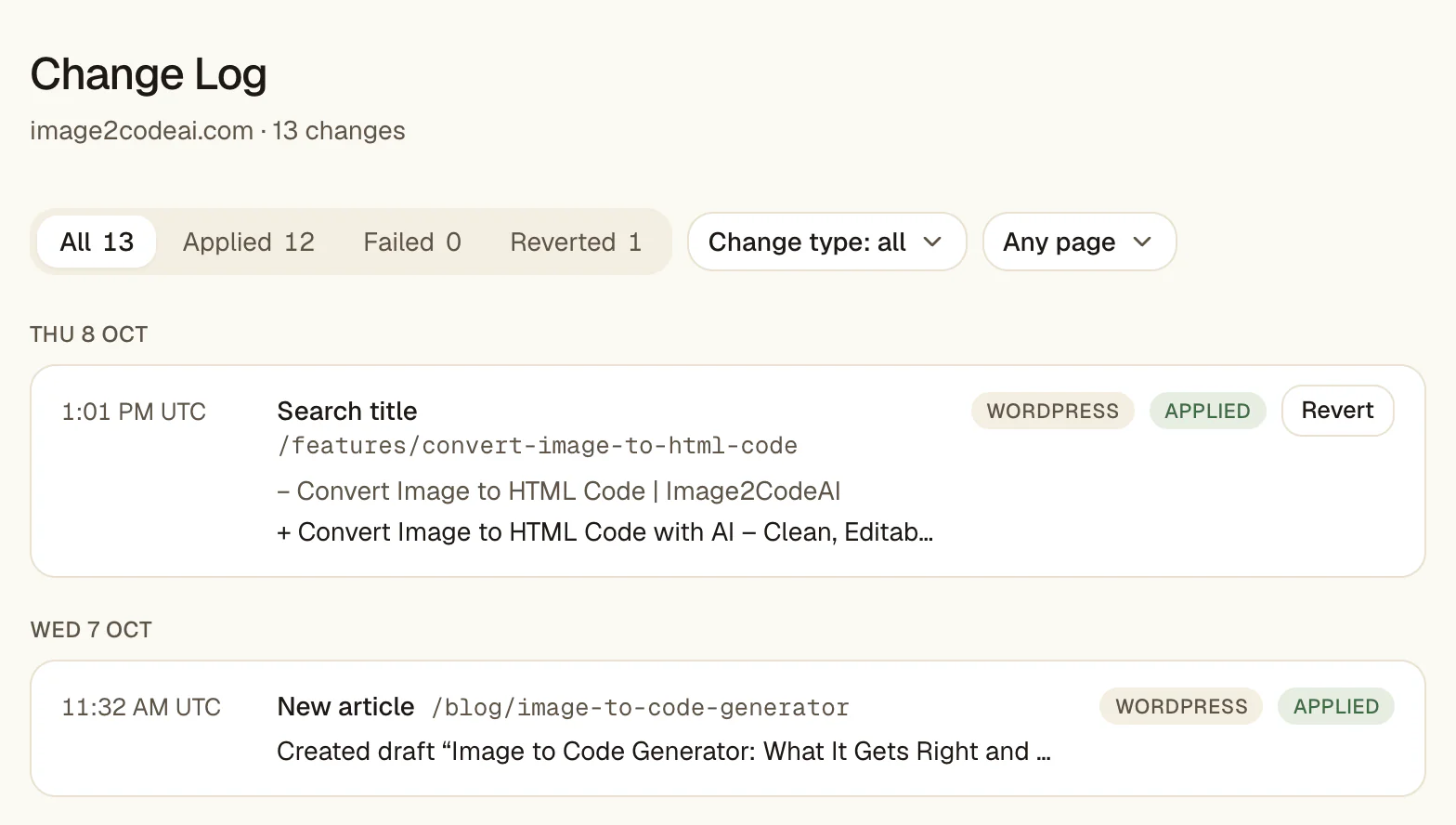
The Change Log is the record of work done. It lists every change with its date, page, old value and new value, and you can filter it by status (applied, failed or reverted), by change type and by page. For a monthly update, filter to applied changes and summarize them: which pages got new titles, which posts gained internal links, which articles published.
What it does not have: no PDF or CSV export, no scheduled report emails and no report builder, and the Change Log does not show which team member approved a change. Pair it with your reporting tool and put the Change Log summary next to the traffic charts. Our guide to white-label SEO reporting covers building that client report; the Change Log supplies the section on what you did.
Tie changes to results with care. A title approved on the 3rd and a rise in clicks by the 20th is a correlation, not proof. In Search Console you can filter the Performance report to one page and compare two date ranges, which is the honest way to show a before and after.
White-label: what your client will see
RankHive is not white-label. There is no client portal under your domain, no custom branding, and nothing you can resell as your own product.
A client meets RankHive in three places. If you invite them, the app is RankHive-branded, at RankHive’s address. The emails it sends, such as the one saying articles are ready for approval, are RankHive-branded and go to every member of the team. And the plugin in their WordPress admin is called RankHive AI SEO Agent.
So tell clients you use it, the way you would name any tool in your stack. If you need a branded client portal, use a reporting tool built for that; our white-label SEO reporting guide compares the options. RankHive then sits behind it as the place the work gets done.
Pricing per client site
Each client team needs its own subscription, and each subscription covers one WordPress site: $49.99 a month or $499.99 a year.
The arithmetic is linear. Five client sites cost $249.95 a month, or $2,499.95 a year on yearly billing. Ten cost $499.90 a month, or $4,999.90 a year. There is no agency discount, no minimum and no seat charge: add as many of your staff to a team as you need.
Each subscription includes the weekly audit and up to 16 drafted articles a month for that site. The article count resets every month, on yearly plans too, and it doesn’t pool across clients.
Billing belongs to the team. Most agencies pay for client sites and pass the cost on in the retainer. If a client wants to pay directly, they need to be an owner of their team, because only owners can manage billing.
Cancel any time; access continues to the end of the paid period, and there are no refunds. There is no free plan or trial. Before you pay, onboarding shows the first places RankHive found to look in the client’s Search Console data, which is a fair check that the site has enough data to work with.
Handing a site back to the client
Engagements end. When one does, the client keeps everything RankHive changed. Titles, descriptions, canonicals, content edits and alt text are saved in WordPress. Structured data, redirects and robots.txt rules are served by the RankHive plugin, so the client should keep it installed if they want those to keep working; uninstalling it deletes its redirects.
If the client wants to keep using RankHive, hand over the team rather than starting again. The primary owner can transfer ownership to an existing member, so invite the client contact first, then transfer. The subscription belongs to the team, not to a person, so it carries on, and the queue and Change Log stay with the team. The new owner manages billing and decides which of your staff stay.
One detail to settle first: the team’s Search Console connection uses the Google account it was set up with. If that is your agency account and the client then removes it from their property, RankHive stops getting their data. Leave that access in place, or contact us before you remove it.
If the client is not continuing, an owner cancels the subscription from the team’s Billing page. The changes stay on the site either way.
What this frees your team to do
The work that justifies a retainer is judgment: which markets to enter, how to restructure a catalog, why a competitor is winning, what to do after a traffic drop. None of that is automatable and none of it should be.
The work that fills the week is execution volume. Moving that into a review queue lets a senior strategist cover more accounts without the quality falling, because they spend their hours on decisions rather than typing.
The honest framing is not headcount reduction. It is that the fixes everyone agreed on in March actually ship in March.
What RankHive does not do for agencies
There is no multi-site dashboard. Each client site is a separate team and subscription. You switch between teams from one login, but there is no single view across your portfolio. Twenty sites means twenty teams to switch between.
There is no white-label, no report export and no read-only role. Clients who get a login can act, not just look.
There is no consolidated billing and no agency tier. Every site is $49.99 a month, billed per team.
There is no backlink or competitor research. Keep your research platform; RankHive works after research, on execution.
These are absences, not roadmap hints. We would rather you know now than find out after onboarding three clients.
Use cases
Audits get delivered; the fixes in them rarely ship because nobody can bill twelve hours of title-tag work.
Each client team runs its own weekly queue. The team reviews rather than produces, and the March audit is done by April.
Capacity is capped by hours, and on-page maintenance eats the hours that should go to strategy.
Maintenance moves to a review queue per client, freeing the hours that are actually billable at a good rate.
A client insists on approving anything that goes on their site, and email threads about title tags are eating the week.
The client joins their team as a member and signs off articles in the Content Calendar, while your team approves the technical fixes.
A client is asking what changed on their site this quarter and the honest answer is not much.
A dated log of approved changes per site, with old and new values, which is a far better answer than another report.
When to look elsewhere
If you need a single dashboard across every client, view-only client logins, or white-label reporting, buy something built for that. This is not it, and no configuration makes it so.
If your clients are mostly not on WordPress, the coverage will not justify the workflow change.
If what you actually sell is strategy and the execution is already handled by an in-house team with capacity, you do not have the problem this solves.
Common objections
Is there an agency or multi-site plan?
Not today. One subscription covers one WordPress site at $49.99 a month, so a portfolio is that many subscriptions. If you run enough sites for that to be awkward, get in touch and tell us how many. That is the input we are using to decide whether to build a multi-site tier.
Can I white-label it for clients?
No. There is no client-facing branding, no portal under your domain, and no resellable interface. The app, its emails and the WordPress plugin all say RankHive. Use it as an internal tool and report on the work through your own channels.
Will it publish to a client site without asking?
No. Every change waits for approval, per site. On client work that approval step is the whole point: an agency tool that edits a client site on its own creates a liability you cannot explain away.
Can I give a client view-only access?
No. RankHive has owner and member roles only, and members can approve and revert. If a client should only see the work, share your screen or send a Change Log summary.
Does it replace Semrush or Ahrefs in our stack?
No. Those are research platforms. RankHive does no backlink or competitor research, and its keyword ideas only cover the site it is connected to. It sits after research, on execution, so keep your research subscription.
What if a client is not on WordPress?
Then this does not apply to that client. The write path is WordPress-specific, through a plugin. Shopify, Webflow and headless clients are out of scope.
Approval per site
Nothing reaches a client site until someone in that client’s team approves it.
Transparent per-site pricing
$49.99 per WordPress site per month. No agency tier, no minimum, no seat charge, no quote.
An internal tool, honestly
No white-label. Agencies run it behind their own reporting.
Frequently asked questions
What is SEO agency software?
Broadly, three different categories sold under one phrase. Research platforms like Semrush and Ahrefs supply the data. Reporting tools assemble client-facing dashboards. Execution tools do the on-page work itself. Most agencies need at least two of the three, and confusion between them is why so many stacks have overlapping subscriptions. RankHive is only the third.
How much does RankHive cost for an agency?
$49.99 per month per WordPress site, or $499.99 a year. Ten client sites is ten subscriptions: $499.90 a month, or $4,999.90 a year on yearly billing. There is no bulk tier, no seat charge and no minimum commitment; sites are added and cancelled individually.
Can one client see another client’s site?
No. Each client site lives in its own team, and people only see the teams they belong to. Your staff can belong to every client team; a client you invite belongs only to theirs.
Does RankHive offer white-label SEO reporting?
No. There is no brandable report, no export, no client portal under your domain, and nothing resellable as your own product. If white-label delivery is a requirement, tools built around agency branding will serve you better. RankHive works as internal tooling; you report through your own channels.
Can we manage all our client sites from one login?
One at a time. Each client site is its own team and subscription, and you switch between them from the same login. There is no portfolio view yet; that is the main thing a multi-site tier would add if we build one.
Is this a replacement for hiring an SEO specialist?
No, and agencies that frame it that way to clients tend to regret it. It removes execution volume: the repetitive on-page work that is hard to bill and easy to defer. It does not decide strategy, diagnose a traffic collapse, or handle a migration. Those are the reasons clients pay you, and they are untouched.
Running SEO across a client portfolio?
RankHive is one subscription per WordPress site today. Tell us how many client sites you manage and we will tell you honestly whether it fits.
Contact us